
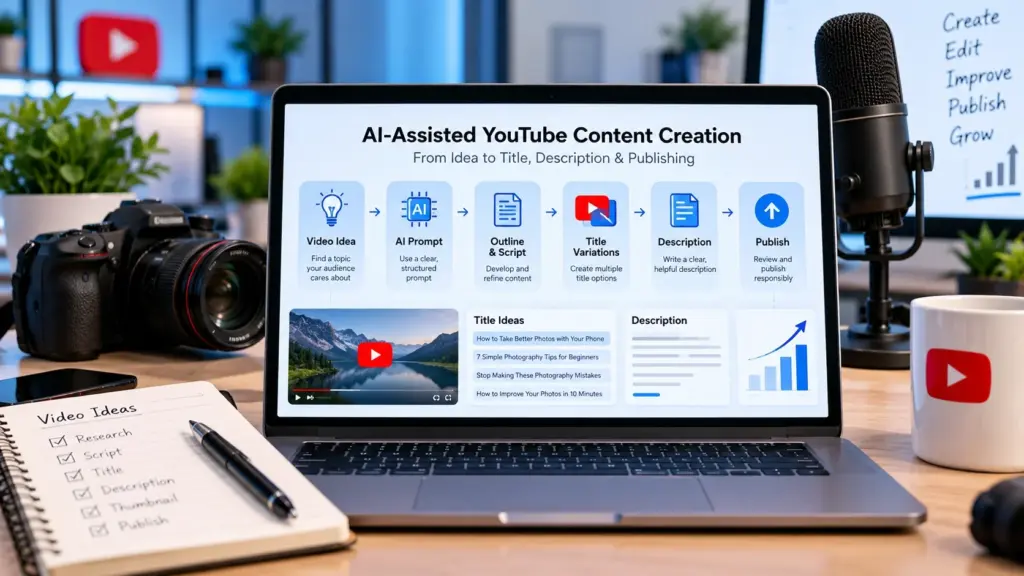
AI can make parts of YouTube content creation faster, but it works best as a creative assistant rather than a replacement for the creator. You can use AI to brainstorm video ideas, organize research, develop an outline, generate title variations, draft a description, and identify questions your audience may have.
The important part is what happens after AI generates the first draft. You still need to check facts, add your own experience or perspective, remove generic wording, and make sure the finished video genuinely delivers what its title and thumbnail promise.
YouTube’s current guidance also distinguishes between ordinary production assistance and meaningful AI-generated or altered content. Using AI for YouTube content creation and for an outline, title, thumbnail, script assistance, captions, or idea generation generally does not itself require the realistic-content disclosure described in YouTube’s policy. Realistic AI-generated or meaningfully altered content can require disclosure.
This guide shows a practical workflow for using AI from the first video idea through publishing, while keeping the creator responsible for the final result and AI .
Quick Answer: How Can AI Help With YouTube Content Creation?
A practical AI-assisted workflow looks like this:
Idea → Research → Prompt → Outline → Script → Title → Description → Human Review → Thumbnail → Publish → Analyze
AI can help with many of these steps, but you should not automatically publish everything it produces.
The strongest workflow is AI-assisted, human-reviewed content.
Key Takeaways
- Start with the audience’s problem or interest rather than asking AI for random ideas.
- Give AI enough context to produce useful results.
- Treat AI output as a draft, not a finished video.
- Create several title and description variations instead of accepting the first result.
- Fact-check information before publishing.
- Keep your own experience, examples, opinions, and storytelling in the content.
- Follow YouTube’s AI disclosure requirements when your content involves realistic AI-generated or meaningfully altered material.
1. Start With a Real Video Idea
AI can generate hundreds of video ideas in seconds, but quantity isn’t the same as usefulness.
Instead of asking:
“Give me 100 YouTube video ideas.”
start with your audience.
For example, suppose you run a channel about beginner photography.
A stronger prompt would be:
“I create beginner photography tutorials for smartphone users. Give me 10 video ideas that solve common problems beginners face when taking photos indoors.”
Now the AI has useful context:
- Audience.
- Subject.
- Skill level.
- Platform.
- Problem.
The result is more likely to be relevant.
A simple idea framework
Before using AI, identify:
Audience: Who is watching?
Problem: What are they struggling with?
Outcome: What should they learn or accomplish?
Format: Tutorial, comparison, explanation, review, story, or demonstration?
For example:
Beginner YouTubers → struggle with video titles → want clearer titles → tutorial.
This produces a much stronger starting point than simply asking AI to “make a viral idea.”
2. Use AI to Develop the Idea
Once you have a basic idea, ask AI to challenge and expand it.
For example:
“I want to create a beginner video explaining how to write better YouTube titles. Suggest the key questions a beginner would expect the video to answer. Group them into introduction, main lesson and practical examples.”
Now you can use the response to build your content structure.
You can ask AI to identify:
- beginner questions,
- common mistakes,
- examples,
- opposing viewpoints,
- practical exercises,
- missing information.
But don’t blindly accept everything it generates.
AI can produce inaccurate, outdated, or overly generic suggestions. Even YouTube’s own AI-assisted creator features warn that generated ideas can vary in quality and should be reviewed carefully. YouTube is also expanding AI-assisted creator tools. Its Help documentation says the Inspiration tab is being gradually deprecated from August 2026, with creators directed toward Ask YouTube Studio for brainstorming guidance.
YouTube also provides Ask Studio, an AI-assisted feature integrated into YouTube Studio that can help creators brainstorm ideas, summarize comments and understand channel metrics.
3. Give AI a Better Prompt
The quality of AI output often depends on the information you provide.
A useful YouTube content prompt can contain five elements:
| Element | Example |
|---|---|
| Role | YouTube content strategist |
| Audience | Beginner creators |
| Topic | YouTube title writing |
| Goal | Teach practical title-writing skills |
| Format | 8-minute educational video |
You can make it even more specific:
“Act as a YouTube education content assistant. Help me create an 8-minute beginner-friendly video explaining how to write better YouTube titles. Include search intent, clarity, title examples, common mistakes and a short practical exercise. Avoid unsupported claims about guaranteed views or CTR.”
This gives the AI boundaries.
You can use ToolMindAI’s AI Prompt Generator to help develop structured prompts when you’re not sure how to phrase your request.
4. Turn the Idea Into an Outline
Don’t immediately ask AI to write an entire script.
Start with an outline.
For example:
Video: How to Write Better YouTube Titles
- Why titles matter
- Search intent
- Writing clear titles
- Creating curiosity without clickbait
- Title examples
- Common mistakes
- Testing different versions
- Final checklist
An outline lets you evaluate the video’s logic before investing time in a full script.
It also makes it easier to add your own examples and experiences.
5. Use AI to Assist With the Script
Once the outline is ready, AI can help turn individual sections into a first draft.
However, don’t publish the generated script unchanged.
Add things AI cannot know automatically about your channel, such as:
- your personal experience
- your demonstrations
- your opinions
- your audience’s recurring questions
- your real examples
- your testing results
- mistakes you personally made
For example, instead of saying:
“Here are five tips for better titles.”
you might explain a title you actually used, what you learned from it, and how you changed your approach.
That turns generic AI output into creator-led content.
6. Generate Multiple YouTube Titles
After the video is developed, create title variations.
Don’t ask:
“Give me one perfect title.”
Ask for several different approaches.
For example:
Search-focused:
How to Write Better YouTube Titles.
Problem-focused:
Why Your YouTube Titles Aren’t Getting Clicks.
List-focused:
7 Ways to Write Better YouTube Titles.
Curiosity-focused:
The YouTube Title Mistakes Most Beginners Make.
Then compare them against the actual content.
The title must accurately represent the video.
YouTube recommends accurate, succinct titles and distinguishes between titles designed to clearly communicate what viewers can expect and titles designed to create curiosity.
You can use ToolMindAI’s YouTube Title Generator to brainstorm variations, then manually select and refine the ones that genuinely fit your video. For a deeper look at search intent, clarity, CTR and title testing, read our guide on how to write better YouTube titles in 2026.
7. Create the YouTube Description
After the title, AI can help create a first draft of your description.
A useful description should explain what the video covers rather than simply repeating keywords.
For example:
“In this video, you’ll learn how to write clearer YouTube titles, understand search intent, create curiosity without misleading viewers, and test different title approaches.”
Then add relevant information such as:
- important resources,
- timestamps,
- related videos,
- links,
- calls to action,
- channel information.
ToolMindAI’s YouTube Description Generator can help you create a starting draft.
But read the entire description before publishing. Remove irrelevant claims, unnecessary repetition, and information the video doesn’t actually cover.
8. Review Everything Before Publishing
This is one of the most important steps in an AI-assisted workflow.
Before publishing, check:
Accuracy
Are the facts correct?
Relevance
Does everything relate to the actual video?
Originality
Does the content contain your own contribution?
Tone
Does it sound like your channel?
Claims
Have you accidentally promised results that cannot be guaranteed?
Examples
Are examples accurate and understandable?
Links
Do all links work?
Title
Does the title accurately describe the video?
Thumbnail
Does the thumbnail reinforce the same promise?
AI can help produce drafts, but the creator remains responsible for what gets published.
9. Know When YouTube Requires AI Disclosure
This is especially important when using AI to create video or audio.
YouTube says creators must disclose AI-generated or meaningfully altered content when it creates realistic situations such as making a real person appear to say something they didn’t say, altering footage of a real event or place, or generating a realistic scene that did not happen.
By contrast, YouTube lists several forms of ordinary production assistance that don’t require this disclosure, including using generative AI for an outline, script assistance, thumbnail, title, infographic, captions, idea generation, or certain audio/video improvements.
So the practical rule is:
Using AI to help create your content is not the same thing as presenting realistic AI-generated material as if it were real.
When your content crosses into realistic synthetic or meaningfully altered media, check YouTube’s current disclosure requirements before publishing.
YouTube also provides viewers with “How this content was made” information that can indicate when content has been meaningfully altered or synthetically generated.
10. Don’t Let AI Replace Your Voice
One of the easiest ways to make an AI-assisted video feel generic is to remove the creator from it.
AI can help with:
Brainstorming → Structure → Drafting → Refinement
But you should contribute:
Experience → Examples → Judgment → Verification → Final voice
For example, AI might suggest:
“Consistency is important for YouTube success.”
That’s generic.
A creator can make it useful by explaining:
“I originally tried uploading every day, but I couldn’t maintain the quality. I changed my schedule to two well-researched videos each week.”
The second version contains a real perspective.
That’s the kind of contribution that makes AI assistance more useful rather than simply producing more text.
11. A Complete AI-Assisted YouTube Workflow
Here’s a practical process you can repeat:
1. Choose a problem
Identify something your audience genuinely wants to understand.
2. Research the topic
Check reliable sources and current information.
3. Brainstorm with AI
Generate angles, questions and possible approaches.
4. Build an outline
Choose the strongest points and arrange them logically.
5. Develop the script
Use AI for drafting assistance while adding your own examples.
6. Generate title variations
Create search-focused, benefit-focused and curiosity-focused options.
7. Create the description
Summarize what the viewer will actually learn.
8. Create the thumbnail concept
Make sure the visual and title work together.
9. Review everything
Fact-check, edit, verify links and remove unsupported claims.
10. Publish and analyze
Review performance after publication and use the information to improve future content.
This workflow keeps AI in its proper role: an assistant inside the creative process, not the owner of the process.
Common Mistakes When Using AI for YouTube
Asking for “viral” content
No prompt can guarantee that a video will go viral.
Publishing the first AI draft
First drafts often need significant editing and fact-checking.
Using the same formula for every video
Your audience may respond differently to tutorials, reviews, stories and comparisons.
Adding unnecessary keywords
Titles and descriptions should remain natural and useful.
Ignoring AI disclosure requirements
Realistic AI-generated or meaningfully altered content can require disclosure under YouTube’s current rules.
Removing the creator’s personality
AI should make your workflow more efficient, not make every video sound identical.
Frequently Asked Questions
Can AI create an entire YouTube video?
AI can assist with many parts of production, including ideas, outlines, scripts, titles, thumbnails and other production tasks. However, creators should review the output, verify information and remain responsible for the final content.
Can I use AI to write YouTube titles?
Yes. AI can generate title variations, but you should select and edit them based on the actual video’s subject, audience and intent.
Does using AI for a YouTube script require disclosure?
Not necessarily. YouTube specifically lists production assistance such as using generative AI to create or improve an outline or script among examples that don’t require the realistic-content disclosure by themselves.
Does AI-generated video require disclosure?
Realistic AI-generated or meaningfully altered content may require disclosure. YouTube’s examples include realistic synthetic scenes, altered real events and making real people appear to do or say things they did not.
Should I publish AI-generated content without editing it?
It’s better to review and edit it carefully. AI can make factual errors, produce generic language or misunderstand the intended audience.
Can AI help with YouTube descriptions?
Yes. AI can create a first draft based on the video’s actual content. The creator should then review the description for accuracy, relevance, links and unnecessary repetition.
Can AI help me find YouTube video ideas?
Yes. It can brainstorm topics, questions and angles. However, ideas should be evaluated against your audience and checked for relevance before becoming videos.
Is AI a replacement for a YouTube creator?
AI can automate or assist with parts of the workflow, but the creator still provides the subject knowledge, judgment, creative direction and final review.
Should I use AI for every video?
Not necessarily. Use it where it genuinely saves time or improves the workflow. Some creators may prefer manual research, scripting or brainstorming for certain projects.
Continue Learning
Ready to explore more AI-powered creator workflows? Browse ToolMindAI’s AI Creator Tools for additional tools that can help with prompts, YouTube titles and descriptions.
Final Thoughts
AI can make YouTube content creation more efficient, but the best workflow is not “AI creates everything and I publish it.”
A better approach is:
You choose the idea → AI helps develop it → you add expertise and personality → AI assists with packaging → you review everything → you publish responsibly.
This approach also gives you more control over quality. Instead of chasing automated content volume, you can spend your time improving the parts that make a video genuinely useful to viewers.
YouTube itself describes AI as a tool for creative expression rather than a replacement for creators, while its 2026 updates continue to expand AI-assisted creation alongside stronger transparency measures.
If you use AI thoughtfully, the goal isn’t to make your channel more automated. It’s to make your creative process more capable and efficient without losing the human contribution that makes the content worth watching.
Good emphasis on AI as a creative assistant rather than a replacement. The reminder to check that the finished video genuinely delivers what the title and thumbnail promise is important, as that is where generic AI titles often go wrong. The clarification about when YouTube’s disclosure rules apply is helpful too.