
Editorial note
A YouTube title has two jobs: tell viewers what the video offers and give them a reason to consider watching it. A good title is not simply a collection of keywords or a formula designed to “beat the algorithm.” It should accurately represent the video, communicate its value quickly, and work together with the thumbnail.
In 2026, this matters even more because YouTube evaluates content across different discovery surfaces. For Search, YouTube considers relevance, engagement, and quality, including how well the title, description, and video content match a viewer’s query. Recommendations are personalized and depend heavily on how viewers respond to content.
That means effective title writing is less about finding a magical number of characters and more about understanding search intent, audience expectations, clarity, curiosity, and actual viewer response.
This guide explains how to write stronger YouTube titles, when to use searchable versus curiosity-driven titles, how CTR fits into the process, common mistakes to avoid, and how YouTube’s current A/B testing feature can help you make decisions using real performance data and specially, how to write better YouTube titles.
Quick Answer: What Makes a Good YouTube Title?
A strong YouTube title should:
- Clearly communicate the video’s subject or benefit.
- Match the viewer’s search intent when targeting Search.
- Put important information early enough to remain visible.
- Create interest without misleading the viewer.
- Work with the thumbnail rather than simply repeating it.
- Reflect what the video actually delivers.
- Be tested and improved using YouTube Analytics when appropriate.
YouTube itself recommends that titles be accurate and succinct, with important words placed near the beginning. It also advises creators to use ALL CAPS and emojis carefully.
Key Takeaways
- Start with the viewer, not the algorithm.
- Understand the reason someone would search for or click your video.
- Use clear language before adding clever hooks.
- Don’t promise something the video doesn’t deliver.
- CTR is useful, but it shouldn’t be treated as the only measure of success.
- Use YouTube’s built-in testing tools when you have enough data to make testing meaningful.
1. Start With Search Intent
Before writing a title, ask:
What does the viewer actually want when they search for this topic?
For example, someone searching “how to edit videos on CapCut” probably wants a tutorial. A title such as:
How to Edit Videos on CapCut: Beginner Tutorial
matches that intent directly.
But a viewer browsing the Home page may not have a specific search query. A title could instead introduce a problem or interesting angle:
I Edited My First Video With CapCut — Here’s What Happened
Both approaches can be appropriate because YouTube has different discovery surfaces.
YouTube describes two useful title approaches: searchable titles, which clearly explain what viewers can expect, and intriguing titles, which create curiosity for people who may not already be searching for the topic.
A simple intent framework
| Viewer intent | Useful title approach |
|---|---|
| Wants an answer | Direct question/answer |
| Wants a tutorial | “How to…” |
| Wants a comparison | “X vs Y” |
| Wants recommendations | “Best…” or “X Things to…” |
| Wants to understand a topic | “What Is…” |
| Browsing for an interesting story | Curiosity-driven |
| Wants a solution | Problem → solution |
Don’t force a keyword into a title if it makes the title unnatural. The title should make sense to a human first.
If you are still experimenting with different title angles, you can use the YouTube Title Generator to generate several starting variations.
2. Make the Title Clear Before Making It Clever
One of the easiest mistakes is trying too hard to create a “viral” title.
Compare:
Bad:
You Won’t Believe What Happened When I Tried This!
Clearer:
I Tried Editing a Full Video With AI — Here’s What I Learned
The second title gives the viewer substantially more information.
YouTube specifically recommends accurate, succinct titles and warns against misleading or sensational packaging.
A useful test is:
If someone sees only my title for two seconds, will they understand what this video is about?
If the answer is no, simplify it. For more information, go through YouTube’s official title and thumbnail guidance.
Watch: YouTube’s Official Guide to Titles & Thumbnails
If you want to see YouTube’s own recommendations for creating effective titles and thumbnails, this official YouTube Creators video provides a practical overview.
3. Put the Most Important Information Early
Titles can appear differently depending on the device and YouTube surface. YouTube recommends putting the most important words near the beginning and saving episode numbers or branding for the end.
For example:
Less effective structure:
My Complete Beginner Guide to Creating Professional YouTube Thumbnails in 2026
More focused:
YouTube Thumbnail Design: Beginner Guide for 2026
The second version communicates the subject immediately.
However, don’t obsess over an arbitrary character limit. There isn’t one universal “perfect” title length that guarantees performance. Clarity and relevance matter more than hitting an exact character count.
4. Understand CTR Without Chasing It
Click-through rate (CTR) measures how often viewers watch after seeing a registered YouTube impression. But CTR varies according to factors such as audience, traffic source, and where the impression occurred. Google Help
So a title should not be judged only by:
“Did this title get a high CTR?”
Consider the complete viewer journey:
Impression → Title/Thumbnail → Click → Watch → Satisfaction
YouTube’s current recommendation guidance groups performance into appeal, engagement, and satisfaction. Packaging gets people interested, but the actual video needs to deliver on that promise. Google Help
This is why misleading clickbait can be counterproductive. A title may attract curiosity, but if the video doesn’t satisfy the expectation, the packaging has failed its larger purpose.
5. Make Your Title and Thumbnail Work Together
Your title and thumbnail should form a single package.
They don’t necessarily need to say exactly the same thing.
For example:
Title:
Why Your YouTube Videos Aren’t Getting Views
Thumbnail text:
THE REAL PROBLEM
The title establishes the subject while the thumbnail adds visual curiosity.
Avoid repeating the same sentence in both places. Instead, think of them as two pieces of information that answer:
- What is this about?
- Why should I care?
YouTube says thumbnails and titles give viewers an initial understanding of what a video is about and recommends considering the two together.
6. Use Specific Benefits Instead of Empty Hype
Compare:
“The Ultimate YouTube Secret You NEED to Know!”
with:
“7 YouTube Title Mistakes That Make Videos Harder to Find”
The second communicates a specific problem and expected benefit.
Useful title structures include:
- How to [achieve something]
- [Number] Ways to [achieve something]
- Why [problem] Happens
- [Topic] Explained for Beginners
- [Topic] vs [Topic]
- I Tried [Method] — Here’s What I Learned
- Before You [Action], Watch This
- A Beginner’s Guide to [Topic]
These aren’t guaranteed formulas. They are starting points that should be adapted to the actual video.
7. Avoid Common YouTube Title Mistakes
Keyword stuffing
Don’t write:
YouTube SEO Tips YouTube SEO Guide YouTube SEO Tutorial
It is difficult to read and doesn’t communicate a natural promise.
Instead:
YouTube SEO for Beginners: 7 Practical Tips
Misleading promises
If your video explains three methods, don’t title it:
The Only YouTube Strategy You’ll Ever Need
unless the content genuinely supports that claim.
Excessive capitalization
THIS WILL CHANGE YOUR CHANNEL FOREVER!!!
can look artificial and reduce clarity. YouTube recommends limiting ALL CAPS and emojis rather than using them excessively.
Vague titles
My New Video
tells a potential viewer almost nothing.
Stuffing dates into every title
Adding “2026” can be useful when freshness genuinely matters. But don’t add a year simply because it is currently 2026.
8. Test Titles Instead of Guessing
One of the most useful changes for creators is YouTube’s native A/B testing for titles and thumbnails.
According to current YouTube Help documentation, eligible creators can test up to three different titles, thumbnails, or combinations on supported videos. YouTube evaluates the experiment using watch time, rather than simply choosing the option with the highest CTR. Google Help
The feature is currently available through YouTube Studio on desktop and does not support Shorts, scheduled Lives, or Premiere videos in the same way. Tests can take several days and up to two weeks.
This creates a better testing mindset:
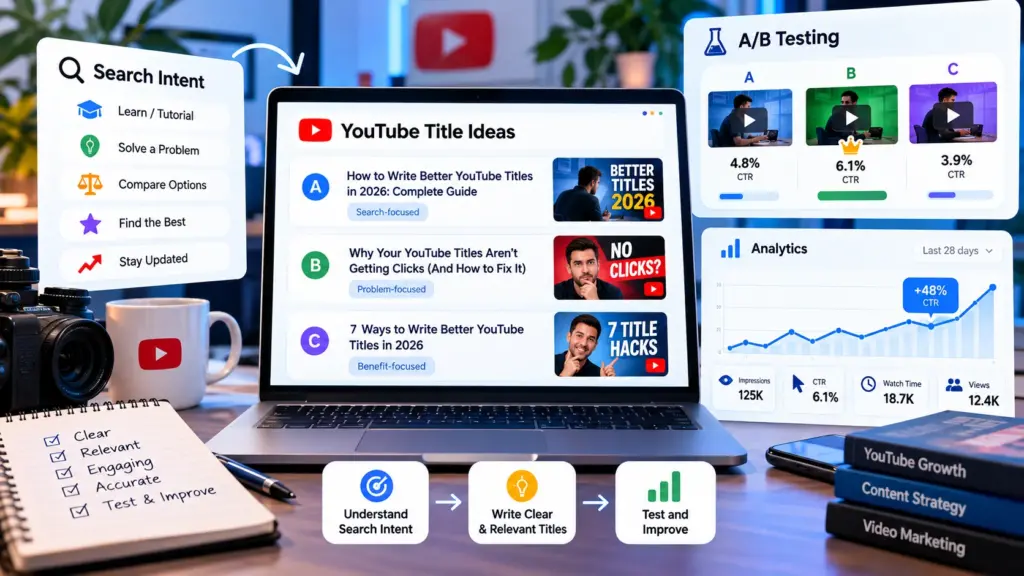
Version A — Search-focused
How to Write Better YouTube Titles
Version B — Problem-focused
Why Your YouTube Titles Aren’t Getting Clicks
Version C — Benefit-focused
7 Ways to Write Better YouTube Titles
These versions target the same underlying topic but package the value differently.
YouTube recommends making test versions meaningfully different enough to produce useful comparisons.
9. A Practical Title-Writing Workflow
Use this five-step process before publishing.
Step 1: Identify the video’s core topic.
What is the video actually about?
Step 2: Identify the viewer’s intent.
Are they searching for an answer, tutorial, comparison, solution, or entertainment?
Step 3: Write a plain-language title.
Don’t worry about cleverness yet.
Step 4: Add an appropriate hook.
Introduce a benefit, curiosity element, specific result, problem, or interesting angle without misleading the viewer.
Step 5: Test and learn.
Use Analytics and, where available, YouTube’s A/B testing functionality.
10. Use ToolMindAI to Generate Title Ideas
If you have the topic but are struggling to develop different title angles, the free YouTube Title Generator can help generate multiple starting ideas from a topic, category, and content style. For a broader content workflow, you can also use the AI Prompt Generator for brainstorming, followed by the YouTube Description Generator when you’re ready to prepare the video’s description.
The important step is reviewing the generated titles yourself. A generator should help with brainstorming, not replace your understanding of the audience or video.
For a complete workflow, you can also use ToolMindAI’s AI Prompt Generator to create a more detailed prompt for title brainstorming, followed by the YouTube Description Generator when you’re ready to prepare the video’s description.
Frequently Asked Questions
What is the best length for a YouTube title?
There is no universal character count that guarantees better performance. Keep the title concise enough that its important information is easy to understand, and place the key subject early.
Should keywords be included in YouTube titles?
Keywords can help communicate relevance, particularly for Search, because YouTube considers how well the title and video content match a viewer’s query. But keywords should be used naturally rather than stuffed into the title.
Does a high CTR guarantee more views?
No. CTR is only one part of the picture. Audience, traffic source, impressions, engagement, and viewer satisfaction also affect how a video performs.
Should every title use clickbait?
No. Curiosity can be useful, but the title should accurately represent the video. Misleading packaging can create a poor viewer experience.
Should I put the keyword at the beginning?
Putting important words early can improve clarity, especially when titles may be truncated. However, forcing every keyword to the first position is unnecessary if it makes the title awkward.
Can I change a YouTube title after publishing?
Yes. YouTube allows creators to edit video titles. However, changes should be based on a clear reason or useful performance information rather than constant random experimentation. YouTube notes that a changed title can affect viewer interaction because the video is presented differently.
Can I A/B test YouTube titles?
Yes, eligible creators can currently test up to three title variations, including title-only tests or title-and-thumbnail combinations, on supported videos. YouTube uses watch time to determine the outcome rather than CTR alone.
Should I use emojis in YouTube titles?
Use them selectively. YouTube recommends limiting ALL CAPS and emojis rather than relying on them excessively.
Is a searchable title better than a curiosity title?
They serve different situations. A searchable title can clearly match an existing query, while a curiosity-driven title can appeal to viewers browsing recommendations. Consider where your intended audience is likely to discover the video.
Can AI write YouTube titles?
Yes. AI can generate title ideas quickly, but the creator should verify accuracy, relevance, originality, and whether the title genuinely represents the video.
Final Thoughts
Writing better YouTube titles in 2026 is not about discovering one secret formula. It is about understanding the viewer, matching intent, communicating value clearly, and learning from actual performance data.
Start with an accurate description of the video’s subject. Make the important information easy to see. Add curiosity only when it strengthens the packaging rather than replacing clarity. Then use YouTube Analytics and, where available, A/B testing to learn which approaches resonate with your audience.
The strongest title is ultimately one that makes the right viewer understand what they’ll get and why the video is worth their attention—and then delivers on that promise.