
AI writing tools can help create content quickly, but the first draft doesn’t always sound natural. You may notice repetitive phrases, predictable sentence patterns, vague explanations, or a tone that feels more mechanical than conversational.
Humanizing AI text isn’t simply about replacing words with synonyms. The goal is to improve the writing so it becomes clearer, more specific, natural, and appropriate for the people who will actually read it.
In this guide, you’ll learn why AI-generated text can sound robotic, what makes writing feel more human, and practical ways to edit AI-assisted content without changing its intended meaning.
Quick Answer: What Does It Mean to Humanize AI Text?
Humanizing AI text means editing AI-generated writing to make it clearer, more natural, specific, and appropriate for its intended audience. This can involve improving sentence variety, removing unnecessary filler, adding useful context and examples, adjusting tone, improving transitions, and reviewing the content for accuracy.
Humanization should be treated as an editing and quality-improvement process, not simply as a way to change text so it produces a particular result in an AI detector.
Key Takeaways
- AI-generated writing can sometimes sound repetitive, generic, or overly structured.
- Humanizing AI text involves meaningful editing rather than simply replacing words.
- Specific examples and useful context can make AI-assisted writing more engaging.
- Varying sentence structure can improve the natural flow of a draft.
- The tone should match the intended audience and purpose.
- Readability, accuracy, and factual consistency should be reviewed before publishing.
- AI humanizers can assist with rewriting, but human review remains important.
- No editing technique can guarantee a particular result from an AI detection system.
Why Does AI Text Sometimes Sound Robotic?
AI writing can be grammatically correct while still feeling unnatural.
One reason is that language models generate text by identifying patterns in language and predicting what wording is likely to follow. As a result, AI-generated drafts can sometimes rely on familiar structures and commonly used expressions.
For example, an AI-generated introduction might begin:
“In today’s fast-paced digital world, it is more important than ever to understand…”
This isn’t necessarily incorrect, but phrases like this can become predictable when they appear repeatedly.
Other common characteristics include:
Repetitive Sentence Patterns
Several sentences may have a similar structure and length, making the paragraph feel monotonous.
Generic Statements
AI-generated writing may make broad statements without providing enough specific information.
Instead of:
“There are many benefits to using this approach.”
A stronger version might explain exactly which benefits, for whom, and why they matter.
Excessive Transitions
Words such as “Furthermore,” “Moreover,” “Additionally,” and “In conclusion” can be useful, but repeatedly using formal transitions can make writing feel formulaic.
Lack of Specific Context
Human writers often draw on specific situations, examples, observations, or audience needs. A generic AI draft may need additional context before it becomes genuinely useful.
Overly Polished Language
Sometimes AI text sounds unnatural because every sentence is written in the same polished, formal style.
Good writing doesn’t always need to sound formal. The appropriate style depends on the audience and purpose.
What Makes AI Writing Sound More Human?
Human-sounding writing isn’t defined by a particular collection of words. It usually comes from clarity, context, variation, and purpose.
Here are several characteristics worth looking for when editing AI-assisted content.
1. Natural Sentence Variety
Good writing usually contains a mixture of short, medium, and longer sentences.
Compare:
AI tools are useful. They save time. They can generate content. They can help writers.
with:
AI tools can save writers considerable time, especially when creating a first draft. But the generated content often needs editing before it is ready for a specific audience.
The second version has more natural variation and communicates a clearer relationship between the ideas.
2. Specific Language
Replace vague claims with useful information.
Generic:
This tool can significantly improve your content.
Specific:
A readability checker can help you identify unusually long sentences, difficult wording, and other patterns that may make an article harder to follow.
The second example tells the reader what the tool actually does.
3. Appropriate Tone
A student guide doesn’t need the same tone as a technical documentation page.
Before editing AI text, ask:
Who is going to read this?
Then adjust vocabulary, sentence complexity, examples, and level of detail accordingly.
4. Useful Context
AI-generated text becomes more valuable when it answers the questions that matter to the specific reader.
For example, instead of simply explaining that readability is important, explain how a blogger, student, or website owner might use readability information differently.
5. Clear Transitions
Natural transitions should connect ideas rather than simply fill space.
Instead of adding “Furthermore” to every new paragraph, make the relationship between the ideas clear.
How to Humanize AI Text: Step-by-Step
Humanizing AI content works best as an editing workflow rather than a single automated action.
Step 1: Read the Entire Draft First
Before changing individual sentences, read the complete AI-generated draft.
Look for:
- Repeated ideas
- Generic introductions
- Unnecessary sections
- Missing information
- Incorrect claims
- Inconsistent tone
- Awkward transitions
Don’t start by changing every word.
First understand what the draft is actually trying to communicate.
Step 2: Remove Generic Filler
AI-generated content can contain sentences that sound professional but don’t provide much value.
For example:
“In today’s rapidly evolving world, understanding this topic is essential for achieving success.”
Ask yourself:
What information does this sentence actually give the reader?
If the answer is “not much,” remove it or replace it with something specific.
Step 3: Vary Sentence Structure
Look at several consecutive sentences.
If they all have approximately the same rhythm and structure, rewrite some of them.
Use:
- Short sentences for emphasis.
- Longer sentences when explaining a connected idea.
- Questions when they genuinely help the flow.
- Lists when several related points need to be scanned quickly.
The objective isn’t to make every sentence different. It’s to avoid unnecessary monotony.
Step 4: Add Specific Examples
Examples are one of the easiest ways to turn generic explanations into useful content.
Instead of saying:
“Make your writing more specific.”
Show the reader what that means.
For example:
Generic:
“Exercise is good for your health.”
More specific:
“A 20-minute walk after work can be an easier routine to maintain than an unrealistic two-hour daily workout.”
The second example gives the reader something concrete to understand.
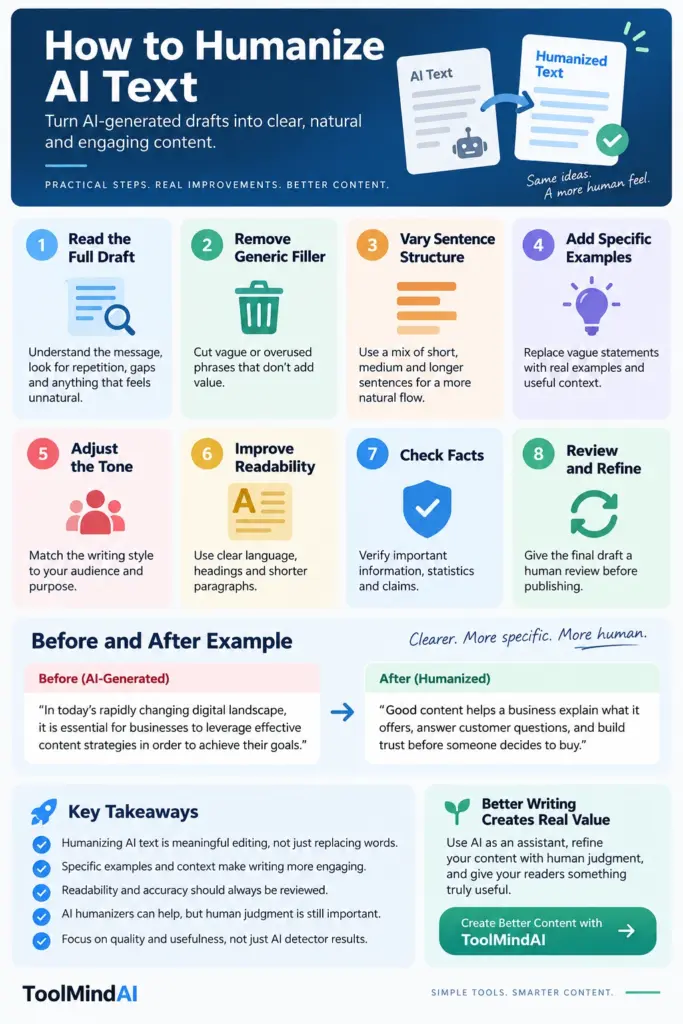
AI-Generated Text Before and After Human Editing
One of the easiest ways to understand AI text humanization is to compare a basic AI-generated sentence with a more carefully edited version.
Example 1: Generic Introduction
Before:
In today’s rapidly changing digital landscape, it is essential for businesses to leverage effective content strategies in order to achieve their goals.
After:
Good content helps a business explain what it offers, answer customer questions, and build trust before someone decides to buy.
The second version removes unnecessary filler and provides a clearer explanation.
Example 2: Repetitive Writing
Before:
AI tools can save time. AI tools can improve productivity. AI tools can help with writing. AI tools can make the writing process easier.
After:
AI tools can speed up the first stage of writing by helping with ideas, outlines, and drafts. The writer can then spend more time checking facts, adding useful details, and shaping the final piece.
The edited version combines repetitive ideas and adds context.
Example 3: Overly Formal Language
Before:
Users should endeavor to utilize appropriate methodologies in order to facilitate the optimization of their written communication.
After:
Use clear writing techniques to make your message easier to understand.
The second version is simpler without losing the original idea.
These examples demonstrate an important point: humanizing AI text isn’t about making every sentence casual. It’s about making the writing appropriate, useful, and natural for its audience.
AI Humanizer vs. Manual Editing
An AI humanizer and manual editing can serve different purposes.
| Approach | Best For | Main Advantage | Limitation |
|---|---|---|---|
| AI Humanizer | Reworking drafts quickly | Saves editing time | May still require review |
| Manual Editing | Final quality control | Greater control over meaning and tone | Takes more time |
| Combination | AI-assisted workflows | Balances speed and control | Requires careful review |
An AI humanizer can provide a useful starting point when a draft contains awkward phrasing or repetitive structures. Manual editing is still valuable for checking facts, adding context, adjusting the voice, and making decisions that depend on the specific audience.
For more background, see our guide on how AI humanizers work.
The strongest workflow isn’t necessarily about choosing one method over the other. In many cases, using automation for an initial revision and then performing a thoughtful human review can provide a better balance.
How Readability Improves AI-Assisted Writing
Natural writing should also be easy for the intended audience to follow.
A paragraph can sound conversational but still be difficult to understand if it contains unnecessarily long sentences, complicated wording, or poor structure.
That’s why readability should be part of the editing process.
For example:
Before publishing an AI-assisted article, review sentence length, paragraph structure, word choice, headings, and overall flow.
You can use the Readability Score Checker to evaluate your content and identify areas that may need simplification.
You can also learn more about what a readability score means and how different readability formulas evaluate written content.
Remember that a higher readability score isn’t automatically better. Technical documentation, academic writing, and specialist content may naturally require more complex language than a beginner-focused blog post.
The appropriate level depends on who you’re writing for and what you’re trying to explain. Google also recommends focusing on accuracy, quality, and relevance when using generative AI for website content. You can read its guidance on using generative AI content for more context.
Can Humanizing AI Text Guarantee It Will Pass AI Detectors?
No.
Humanizing or editing AI-generated text cannot guarantee a particular result from an AI detection system.
AI detectors use different methodologies and can produce different results for the same piece of writing. Their assessments should therefore not be treated as definitive proof about how a piece of text was created.
If you’re interested in AI detection, our guide on how to use an AI Content Detector explains how these tools analyze writing and why their results should be interpreted carefully.
For content creators, the more useful objective is to produce writing that is:
- Accurate.
- Original in its ideas and presentation.
- Useful to the reader.
- Clear and readable.
- Properly reviewed.
- Appropriate for its audience.
Don’t change content solely to chase a particular detector score.
Common AI Humanization Mistakes
1. Replacing Every Word With a Synonym
Simply swapping words doesn’t necessarily make writing more natural. It can actually make the text awkward or change its meaning.
2. Making Everything Casual
Human writing isn’t always informal. A medical explanation, university article, and social media post require different tones.
3. Removing Useful Technical Terms
Don’t simplify a technical concept so much that important meaning disappears. Explain difficult terminology when necessary instead.
4. Adding Random Personal Experiences
Never invent personal experiences simply to make AI writing appear human.
If an example or experience isn’t genuine, present it clearly as a hypothetical example instead.
5. Changing the Meaning
Editing should improve the expression of an idea without accidentally changing what the original content means.
6. Skipping Fact-Checking
AI-generated content can contain incorrect or outdated information. Humanization doesn’t automatically make information accurate.
Always verify important claims before publication.
For a broader perspective on managing risks associated with generative AI, see the NIST Generative AI Risk Management Profile.
Best Practices for Humanizing AI Text
Use this checklist when reviewing AI-assisted content:
- Read the complete draft first.
- Remove generic introductions and unnecessary filler.
- Combine repetitive ideas.
- Vary sentence length naturally.
- Replace vague claims with specific information.
- Add useful examples where they improve understanding.
- Match the tone to the intended audience.
- Break up unnecessarily large paragraphs.
- Use headings and lists where they improve scanning.
- Check facts, statistics, names, and dates.
- Preserve the intended meaning.
- Review the final content yourself before publishing.
The goal is not to make AI-generated content look human. The goal is to make the content genuinely better for the people reading it. For broader guidance on creating useful, trustworthy content, see Google Search Central’s recommendations for helpful, reliable, people-first content.
A Simple AI Content Editing Workflow
A practical workflow can look like this:
1. Generate a first draft
Use AI to help with brainstorming, outlining, or drafting.
↓
2. Review the ideas
Remove irrelevant or repetitive information.
↓
3. Add human judgment
Include specific examples, useful context, original observations, and information relevant to the audience.
↓
4. Improve the writing
Fix awkward sentences, repetitive patterns, unnecessary filler, and tone.
↓
5. Check readability
Review the structure and difficulty of the finished draft.
↓
6. Verify important information
Fact-check claims before publication.
↓
7. Perform a final human review
Read the complete article as if you were the intended reader.
This approach treats AI as an assistant in the writing process, rather than an automatic replacement for editorial judgment.
Starting with a more specific prompt can also reduce generic AI output. You can use the AI Prompt Generator to create more detailed prompts before generating your first draft.
How to Use ToolMindAI’s AI Humanizer
If you’ve already reviewed your AI-generated draft and identified sections that need rewriting, an AI humanizer can help you create an alternative version more quickly.
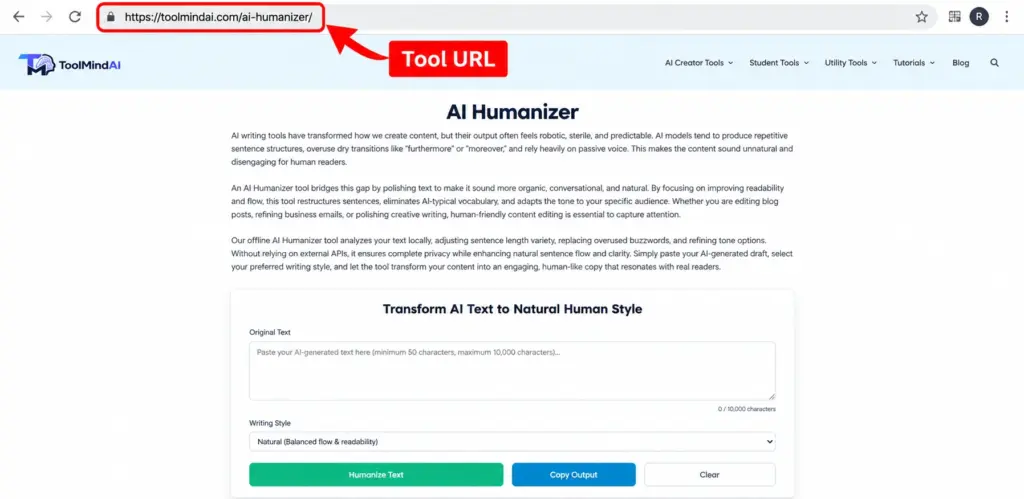
Open the ToolMindAI AI Humanizer, provide the text you want to revise, and review the generated result.
Don’t publish the output automatically.
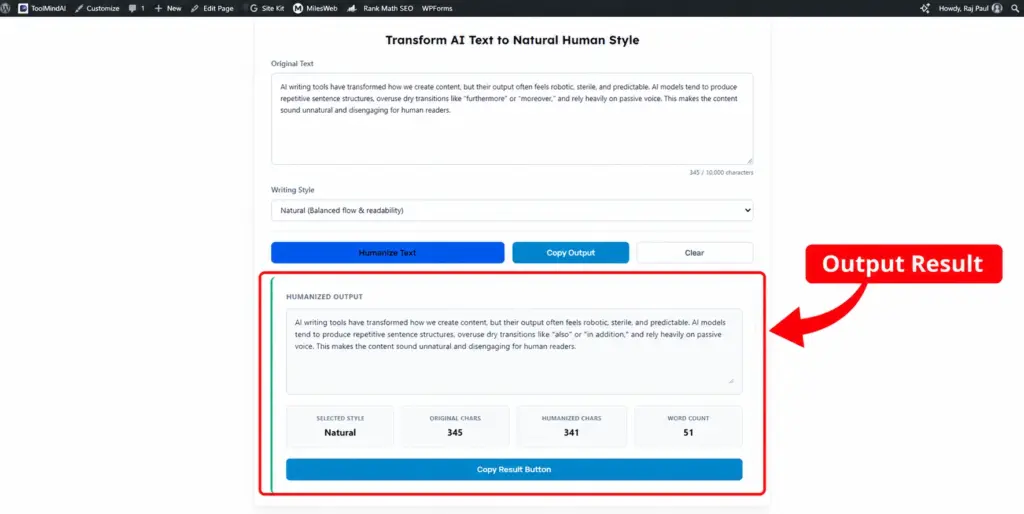
Instead, check whether:
- The original meaning is preserved.
- The wording is natural.
- Important details remain intact.
- The tone fits your audience.
- The content is accurate.
- The result actually improves the original draft.
Think of the tool as an editing assistant, not the final editor.
Frequently Asked Questions
How do I humanize AI text?
Start by reading the complete draft, removing generic filler, varying sentence structure, adding specific examples, improving transitions, adjusting the tone, and checking the content for accuracy and readability.
How can I make AI text sound more natural?
Focus on meaning rather than individual words. Remove repetitive phrases, replace vague statements with specific information, vary sentence structure, and use a tone appropriate for your audience.
Can I use an AI humanizer to edit my content?
Yes. An AI humanizer can help rewrite or refine AI-assisted text, but its output should be reviewed for accuracy, meaning, tone, and usefulness before publication.
How do I make ChatGPT text sound human?
Treat the generated response as a draft. Add relevant context, specific examples, your intended tone, and meaningful edits instead of simply replacing words or phrases.
Does humanizing AI text guarantee that AI detectors won’t detect it?
No. AI detection systems vary and their results are not guaranteed. Humanizing content should focus on improving quality, clarity, accuracy, and usefulness rather than trying to achieve a particular detector result.
Is AI humanization the same as editing?
Not exactly. AI humanization generally focuses on making AI-assisted text sound more natural, while editing is a broader process that can include structure, accuracy, fact-checking, clarity, tone, grammar, and content quality.
Final Thoughts
Humanizing AI text is best understood as thoughtful editing rather than a one-click transformation.
AI can help you brainstorm ideas, create drafts, and speed up repetitive writing tasks. But the final quality depends on how well the content is reviewed, refined, and adapted to the people who will read it.
Remove unnecessary filler. Add useful context. Use specific examples. Vary sentence structure. Improve readability. Verify important claims. Most importantly, make sure the finished content actually provides value.
An AI humanizer can be part of that workflow, but human judgment should remain part of the process.
Want to learn more about interpreting AI-detection results? Read our guide on how to use an AI Content Detector effectively.