
Creating useful content isn’t only about putting the right information on a page. It also depends on how clearly that information is presented. Whether you’re writing a blog post, completing an assignment, preparing website copy, or publishing marketing material, readers are more likely to stay engaged when the content is easy to understand and comfortable to read.
This is where readability becomes important.
Writers often pay close attention to grammar, spelling, and SEO while overlooking another important part of the reading experience: how difficult the text feels to follow. Long sentences, unfamiliar vocabulary, and dense paragraphs can make even valuable information harder to absorb. A readability score gives you a practical way to spot these problems before publishing.
A Readability Score Checker examines your text and provides an estimate of its reading difficulty, sentence structure, and overall clarity. Instead of relying only on your own judgment, you can use measurable feedback to identify areas that may need improvement.
Whether you’re a student, blogger, marketer, business owner, or content creator, learning how readability scores work can help you produce writing that is clearer, more accessible, and more useful to your audience.
In this guide, you’ll learn:
- What a readability score means?
- Why readability matters for different types of content?
- How readability scores are calculated?
- How common readability formulas work?
- How to improve writing naturally?
- How to use the ToolMindAI Readability Score Checker effectively?
Quick Answer: What Is a Readability Score?
A readability score is a measurement that estimates how easy or difficult a piece of writing is to understand. Readability formulas commonly examine factors such as sentence length, word complexity, and text structure to estimate the reading level or difficulty of the content. Writers can use these scores to improve clarity, reader experience, and accessibility.
Key Takeaways
- A readability score estimates how easy or difficult your content is to read.
- Shorter sentences and familiar language often make writing easier to understand.
- Good readability can improve the overall reading experience and help readers stay engaged.
- Readability is useful for blog posts, educational materials, websites, and marketing copy. A Readability Score Checker can highlight areas that may need improvement before publication.
- The ideal readability level depends on the audience and purpose of the content.
💡 Quick Tip: Before publishing an article, run it through the ToolMindAI Readability Score Checker to identify difficult sentences and areas where your wording could be clearer.
What Is a Readability Score?
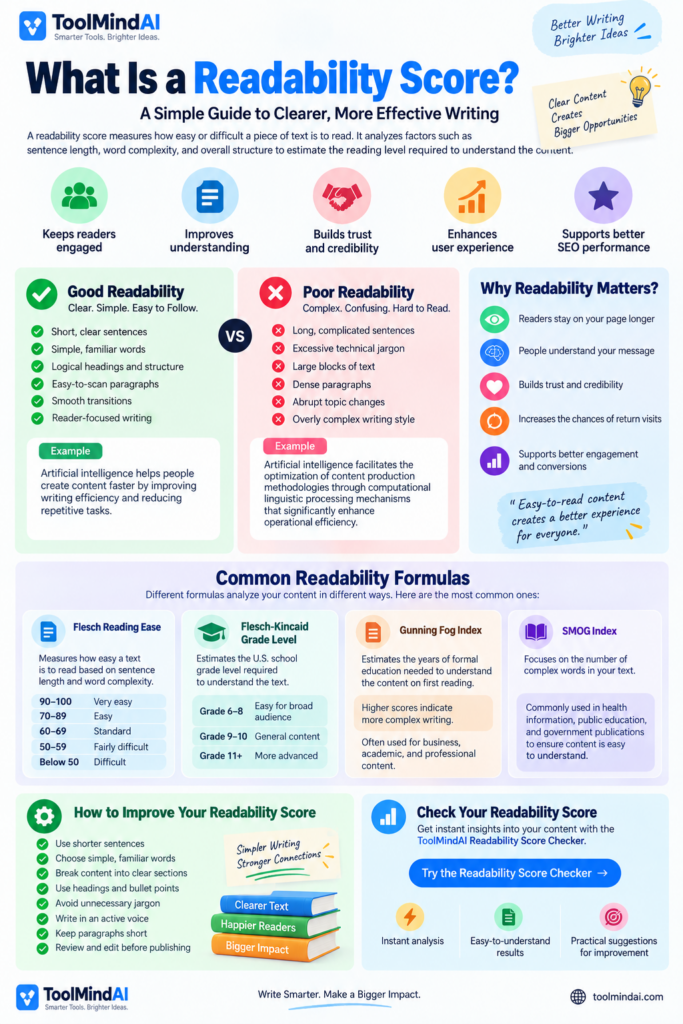
A readability score is a measurement designed to estimate how easy a piece of writing is for a reader to understand. It does not determine whether your ideas are correct or whether your article is valuable. Instead, it looks at characteristics of the writing itself and turns them into a measurable indication of reading difficulty.
Think of it as a writing clarity indicator.
For example, imagine two articles covering the same subject. One uses lengthy paragraphs, specialist terminology, and sentences that continue for several lines. The other uses shorter paragraphs, familiar words, descriptive headings, and straightforward examples. Even if both contain the same information, the second version may be easier for a broader audience to follow.
A readability score can help reveal differences like these by examining factors such as:
- Sentence length,
- Word complexity,
- Paragraph structure,
- Reading difficulty,
- Overall text flow.
The purpose is not to make every piece of writing extremely simple. Instead, readability helps you decide whether the language and structure match the people you are trying to reach.
Although readability itself is not a standalone Google ranking factor, clear and useful writing supports a better user experience. Google recommends creating helpful, reliable, people-first content that is easy for the intended audience to understand.
Good Readability vs Poor Readability
| Good Readability | Poor Readability |
| Short, clear sentences | Long, complicated sentences |
| Simple, familiar words | Excessive technical jargon |
| Logical headings and sections | Large walls of text |
| Easy-to-scan paragraphs | Dense paragraphs with little spacing |
| Smooth transitions between ideas | Abrupt topic changes |
| Reader-focused writing | Overly complex writing style |
Example
Poor Readability
Artificial intelligence facilitates the optimization of content production methodologies through computational linguistic processing mechanisms that significantly enhance operational efficiency.
Good Readability
Artificial intelligence helps people create content faster by improving writing efficiency and reducing repetitive tasks.
Both examples communicate a similar idea, but the second sentence uses more familiar language and a simpler structure, making the message easier for many readers to process.
Why Does Readability Matter?
Good readability is more than a formatting preference. It affects how comfortably people can consume and understand your content. When readers can follow your writing without unnecessary effort, they may be more likely to:
- Stay on the page longer.
- Continue reading through the article.
- Understand your main message.
- Trust the information more easily.
- Return to your website for additional content.
Poor readability can have the opposite effect. If readers encounter long, dense, or confusing passages, they may stop reading before reaching the information they actually need.
This is why many writers use readability checks as part of their editing process.
Want to see how easy your content is to read? Try the ToolMindAI Readability Score Checker to analyze your writing and identify opportunities to improve clarity before publication.
How Are Readability Scores Calculated?
Many beginners assume readability scores are mainly about grammar and spelling. They are not. Readability formulas primarily examine features that influence how much effort a reader may need to understand a passage.
A Readability Score Checker may evaluate characteristics such as:
- Average sentence length,
- Word complexity,
- Number of syllables,
- Paragraph structure,
- Reading difficulty,
- Overall writing flow.
The purpose is not to grade your writing as good or bad. Instead, the score provides an estimate of the reading ability or effort that may be required to understand the text.
For example, an article containing long sentences, specialist terminology, and complex vocabulary will generally be harder to read than an article explaining the same ideas with shorter sentences and more familiar words.
This makes readability analysis useful for bloggers, students, marketers, educators, and businesses that want their messages to be clear.
Common Readability Formulas (Beginner-Friendly)
You don’t need to calculate readability formulas by hand, but knowing what the most common formulas measure makes the results easier to understand.
1. Flesch Reading Ease
Flesch Reading Ease is one of the best-known readability formulas. It estimates how easy a passage is to read by considering sentence length and word complexity.
Generally:
- 90–100: Very easy,
- 70–89: Easy,
- 60–69: Standard,
- 50–59: Fairly difficult,
- Below 50: Difficult.
For many general-audience blog posts and educational articles, a score around 60–80 can be a useful starting point. However, the right target depends on the subject and audience.
The Flesch Reading Ease formula evaluates factors such as sentence length and syllables per word and produces a score from 0 to 100, with higher scores generally indicating easier text.
2. Flesch-Kincaid Grade Level
Flesch-Kincaid Grade Level expresses readability as an estimated U.S. school grade level rather than a score out of 100.
For example:
- Grade 6–8 → Often suitable for a broad general audience,
- Grade 9–10 → Appropriate for more advanced general or educational material,
- Grade 11+ → More suitable for complex or specialized material.
A higher grade-level result does not automatically mean better writing. The appropriate level depends on who will read the content.
The Flesch-Kincaid Grade Level estimates the U.S. school grade level required to understand a piece of writing, using factors such as sentence length and syllable complexity.
3. Gunning Fog Index
The Gunning Fog Index estimates the number of years of formal education a reader may need to understand a passage on the first reading. Higher values generally indicate more complex writing.
It is often associated with:
- Business writing,
- Professional communication,
- Academic or technical material.
4. SMOG Index
The SMOG (Simple Measure of Gobbledygook) Index focuses heavily on complex words and is designed to estimate the education level needed to understand written material.
It is often useful when reviewing:
- Health information,
- Public education materials,
- Government or public-facing information,
- The main goal is to make important information understandable for the intended audience.
Do You Need to Calculate These Manually?
Fortunately, no.
Modern readability tools can perform these calculations in seconds. Instead of counting syllables or measuring sentence lengths yourself, you can paste your writing into a readability checker and receive an analysis of its readability characteristics. This saves time and lets you concentrate on improving the actual content.
How to Use the ToolMindAI Readability Score Checker
Using the ToolMindAI Readability Score Checker is designed to be straightforward and should only take a few moments.
Step 1 — Open the Tool
Open the ToolMindAI Readability Score Checker.
You’ll find a simple editor where you can paste the content you want to analyze.
The tool can be useful for:
- Blog posts,
- Student assignments,
- Website pages,
- Marketing content,
- Emails,
- Product descriptions,
- Social media captions.
How to Use the ToolMindAI Readability Score Checker
Using the ToolMindAI Readability Score Checker is designed to be straightforward and should only take a few moments.
Step 2 — Paste Your Content
Once you’ve opened the ToolMindAI Readability Score Checker, paste the text you want to evaluate into the editor.
You can analyze a complete article or a smaller section of writing. For the most useful results, include enough content for the checker to identify your overall writing patterns.
You can use content such as:
- Blog articles,
- School or college assignments,
- Website copy,
- Product descriptions,
- Marketing material,
- Emails,
- Social media posts.
Tip: Analyze the Final Draft.
For the most meaningful result, check your content after completing your main editing. If you make major changes afterward, run the analysis again because sentence length and word choice can change your score.
Step 3 — Run the Readability Analysis
After adding your content, start the readability analysis.
The checker examines characteristics of your writing and generates readability information based on the text you provided.
Depending on the metrics available, you may see information related to:
- Reading difficulty,
- Sentence length,
- Word complexity,
- Estimated reading level,
- Overall readability,
- Other text-analysis measurements.
The purpose of the analysis isn’t to tell you that your writing is simply “good” or “bad.” Instead, it gives you data you can use during editing.
For example, if your sentences are consistently long, you may decide to divide some of them into shorter sentences. If your writing contains unnecessary complex terminology, you can replace some words with clearer alternatives.
Step 4 — Understand Your Results
A readability report becomes useful when you know how to interpret it.
Don’t focus on one number alone. Instead, look at the overall pattern of your writing.
For example, suppose an article receives a relatively difficult readability result. You could inspect the content and ask:
- Are my sentences too long?
- Am I using unnecessarily complicated words?
- Are my paragraphs too dense?
- Have I explained technical terms clearly?
- Are my headings organized logically?
- Can the intended audience understand the content without extra effort?
- This approach is more useful than simply trying to achieve a particular score.
Remember
A readability score is a guide, not a grade. A technical article written for software developers may naturally be more complex than a beginner’s guide written for students. The goal is to match the writing to your intended audience.
What Is Good Readability Score?
There isn’t one universal readability score that is perfect for every piece of content.
The ideal result depends on:
- Your audience,
- The subject,
- The purpose of the content,
- The type of publication,
- The level of technical knowledge expected from readers.
For example, a children’s educational article should generally use much simpler language than a research-oriented technical document. For general web content, however, many writers aim for writing that is straightforward enough for a broad audience.
A Practical Approach
Instead of asking:
“What is the highest readability score I can get?”
Ask:
“Can my intended reader understand this content easily?”
That’s a much better standard. A readability checker should support your editorial judgment rather than replace it.
How to Improve Your Readability Score
If your content is harder to read than you intended, you don’t necessarily need to rewrite the entire article.
Start with a few practical improvements.
1. Shorten Long Sentences
Readability tools analyze different characteristics of written content and use those measurements to estimate reading difficulty, which can help writers identify sections that may be difficult for their intended audience to understand.
After:
Readability tools analyze different characteristics of your writing. They use those measurements to estimate reading difficulty. This can help you identify sections that may be difficult for your audience to understand.
The second version is easier to scan and process.
2. Replace Unnecessarily Complex Words
You don’t need complicated vocabulary to demonstrate expertise.
For example:
- Utilize → Use,
- Commence → Start,
- Approximately → About,
- Facilitate → Help,
- Demonstrate → Show.
This doesn’t mean every complex word should be removed. Technical terminology is appropriate when your audience understands it and when the term adds precision.
3. Break Up Large Paragraphs
Large blocks of text can feel intimidating, especially on mobile devices.
Whenever a paragraph contains several separate ideas, consider dividing it into smaller sections.
Good web writing often uses:
- Short paragraphs,
- Descriptive headings,
- Bullet points,
- Lists,
- Examples,
- Adequate spacing.
This makes content easier to scan before a reader decides to read it in detail.
4. Use Clear Headings
Headings help readers understand the structure of an article.
Instead of creating vague headings such as:
Important Information
Use descriptive headings such as:
How to Improve Your Readability Score
A good heading tells readers what they will find in the section.
5. Prefer Active Voice When Appropriate
Active voice can make many sentences more direct.
Less direct:
The content was analyzed by the readability checker.
More direct:
The readability checker analyzed the content.
Passive voice isn’t always wrong. It can be useful when the action or result is more important than the person performing it. The goal is simply to avoid unnecessary complexity.
If you’re working with AI-assisted writing, readability should still be reviewed and edited before publishing. An AI Humanizer can be used as an additional writing aid when you want to make AI-assisted text sound more natural, but the final content should still be reviewed for accuracy, clarity, and usefulness.
Readability Tips for Different Types of Content
Blog Posts
- Use straightforward language.
- Keep paragraphs relatively short.
- Explain unfamiliar terminology.
- Use descriptive headings.
- Include examples where they help.
Student Assignments
- Clear explanations,
- Logical organization,
- Appropriate academic vocabulary,
- Accurate terminology,
- Strong transitions between ideas.
A readability score can help identify sentences that may be unnecessarily difficult, but academic writing should still meet the requirements of the assignment.
Website Content
- Short sections.
- Clear headings.
- Concise paragraphs.
- Bullet points.
- Direct language.
Make the most important information easy to find.
Marketing Content
- Communicate value quickly.
- Avoid unnecessary jargon.
- Use language readers can understand easily.
Your reader should understand the main benefit without having to decode the wording.
Technical Content
- Preserve necessary technical terminology.
- Explain complex concepts clearly.
- Match terminology to the audience.
You shouldn’t remove necessary technical terminology simply to achieve a lower reading difficulty. Instead, explain complex concepts clearly while preserving the terminology your audience needs.
Readability and SEO: Is Readability a Ranking Factor?
Readability and SEO are related, but they shouldn’t be treated as the same thing.
Search engines aim to provide useful content that satisfies users’ needs. Clear writing can contribute to a better user experience because visitors can understand information more easily.
However, you shouldn’t rewrite accurate and useful content solely to chase a particular readability score.
Instead, prioritize:
- Helpful information,
- Accuracy,
- Clear organization,
- Search intent,
- Natural language,
- Good user experience.
A readability score is best used as an editing aid, not as an SEO target that you blindly optimize.
Readability Score vs Content Quality
A high readability score doesn’t automatically mean an article is high quality.
Imagine an article that is extremely easy to read but contains inaccurate information. It may score well for readability, but it isn’t useful to the reader. Likewise, a technical article may have a more difficult readability result because it discusses a specialized subject. That doesn’t necessarily make it poor content.
Readability is only one part of content evaluation. Depending on your publishing workflow, you may also want to review whether content appears AI-generated or whether it has originality concerns. For example, an AI Content Detector can provide a separate perspective on AI-writing patterns.
Good Content Requires More Than Readability
High-quality content should combine:
- Accurate information,
- Useful explanations,
- Appropriate language,
- Good organization,
- Original insights,
- Relevant examples,
- Audience awareness.
Readability supports content quality—it doesn’t replace it.
Common Readability Mistakes to Avoid
Mistake 1: Chasing the Highest Possible Score
A higher score isn’t automatically better. Your goal is appropriate readability for your audience.
Mistake 2: Removing Every Complex Word
Some subjects require specialized terminology. Don’t sacrifice accuracy just to make a score look better.
Mistake 3: Making Every Sentence Extremely Short
Short sentences can improve clarity, but too many very short sentences can make writing feel unnatural or disconnected. Mix sentence lengths to create a natural rhythm.
Mistake 4: Ignoring Meaning
Never change wording if the new version changes the intended meaning. Clarity matters, but accuracy comes first.
Mistake 5: Treating the Score as a Final Verdict
Readability formulas are estimates. Use the result as feedback alongside your own editorial judgment.
A Simple Readability Editing Workflow
You can make readability checking part of your normal publishing process.
Before Publishing:
1. Write your first draft — Focus on getting your ideas onto the page.
2. Organize the content — Add appropriate headings, sections, examples, and lists.
3. Edit for clarity — Remove unnecessary wording and improve confusing sentences.
4. Run a readability check — Use the ToolMindAI Readability Score Checker.
5. Review difficult sections — Look for long sentences, complicated wording, and dense paragraphs.
6. Edit naturally — Make improvements without changing your meaning or forcing a particular score.
7. Check again — Run the content through the checker after significant revisions.
This creates a simple write → edit → analyze → improve → review workflow.
When Should You Use a Readability Score Checker?
You don’t necessarily need to analyze every sentence individually. A readability checker is particularly useful when you’re preparing content for a broad audience or when you want an objective second look at your writing.
Consider using one:
- Before publishing a blog post.
- Before submitting an important assignment.
- When rewriting complicated website content.
- When preparing public-facing information.
- When editing marketing copy.
- When simplifying technical explanations.
- When reviewing AI-assisted writing.
It can be especially useful when you’re unsure whether your writing is accessible to people outside your area of expertise.
For a more complete pre-publishing review, readability can be checked alongside other quality considerations such as originality. A Plagiarism Checker can be used as a separate check rather than treating readability and originality as the same thing.
Final Thoughts
Readable writing isn’t about making every sentence as simple as possible. It’s about making your ideas clear, appropriate, and easy enough for your intended audience to follow.
Readability scores provide a useful way to identify potentially difficult writing patterns. They can highlight long sentences, complex wording, and other characteristics that may make content harder to understand.
But the number itself isn’t the goal.
The strongest approach is to combine readability analysis with human judgment. Use the score to identify opportunities for improvement, then decide whether a change actually makes the content clearer and more useful.
Whether you’re writing a blog post, assignment, website page, or marketing message, the same principle applies:
Write for people first, then use readability analysis to make your communication clearer.
For a quick analysis of your own content, try the ToolMindAI Readability Score Checker and use the results as part of your editing workflow.