

Artificial intelligence has transformed modern writing. Today, students use AI to prepare assignments, bloggers draft articles in minutes, marketers create advertising copy faster than ever, and businesses rely on AI to produce emails, product descriptions, website content, and social media posts. These tools have made content creation more efficient, but they have also introduced a new challenge: ensuring that AI-assisted writing remains clear, engaging, and genuinely helpful for readers.
Generating content with AI is only the first step. Before publishing or submitting any document, it’s essential to review the writing carefully. Good content isn’t defined solely by how quickly it was created—it should also be accurate, readable, well-structured, and valuable to its intended audience.
This is where an AI Content Detector becomes an important part of your editing workflow.
Unlike grammar checkers that focus on spelling and punctuation or plagiarism checkers that compare text against published sources, an AI Content Detector analyzes writing patterns commonly associated with AI-generated content. Rather than telling you whether your content is “good” or “bad,” it provides insights that can help you refine sentence flow, improve readability, and make your writing feel more natural.
Whether you’re a student submitting coursework, a blogger publishing long-form articles, a freelancer delivering client work, or a business owner creating website content, learning how to use an AI Content Detector correctly can help you produce content that is more polished, trustworthy, and reader-friendly.
In this comprehensive guide, you’ll learn:
- What an AI Content Detector is,
- How AI Content Detectors work behind the scenes,
- When and why you should use one,
- How to analyze content correctly,
- How to interpret AI detection results,
- Best practices for improving your writing naturally,
- Common mistakes to avoid,
- When human editing is still essential.
By the end of this guide, you’ll understand how AI Content Detectors work, what their results actually mean, and how to use them as part of a responsible, people-first writing process.
Quick Answer: How to Use an AI Content Detector
An AI Content Detector analyzes writing patterns, sentence structure, readability, and language consistency to estimate whether text contains characteristics commonly associated with AI-generated writing. The best way to use an AI Content Detector is as an editing assistant—review its feedback, improve clarity and readability, verify facts, and combine AI insights with thoughtful human editing before publishing.
Key Takeaways
If you’re short on time, here’s what you need to know:
- AI Content Detectors analyze writing patterns rather than checking grammar or plagiarism.
- They estimate whether text resembles AI-generated writing based on language characteristics.
- Detection results should be treated as guidance, not absolute proof.
- The best use of an AI Content Detector is to improve readability and writing quality before publishing.
- AI detection works best when combined with manual editing, fact-checking, and personal expertise.
- High-quality, helpful content matters more than achieving a particular AI score.
💡 Quick Tip: Think of an AI Content Detector as a writing coach rather than a judge. Its purpose is to help you identify opportunities to improve your content—not to replace your own judgment or creativity.
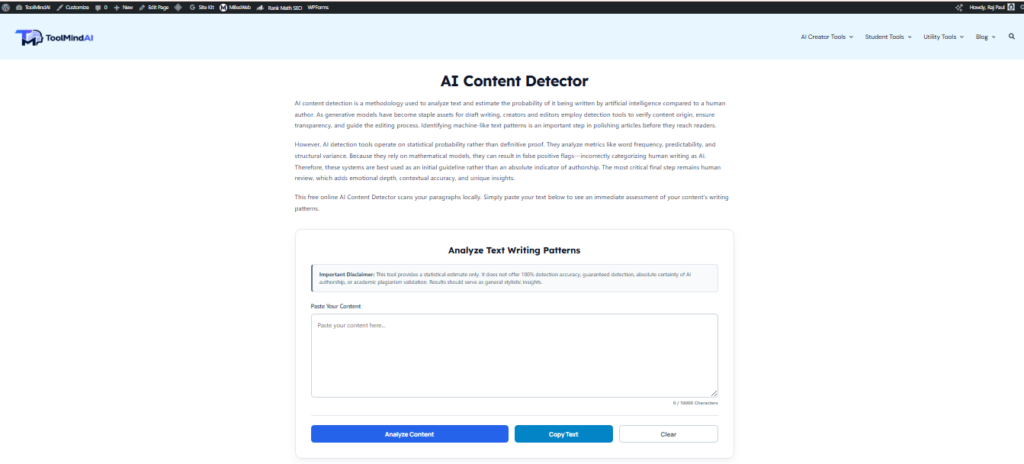
What Is an AI Content Detector?
An AI Content Detector is a writing analysis tool that examines text and estimates whether it contains language patterns commonly associated with AI-generated content. Rather than checking spelling, grammar, or plagiarism, it focuses on how the writing is structured and how naturally ideas flow throughout the document.
Think of it as an intelligent editing assistant.
Instead of asking whether your writing is “correct,” an AI Content Detector asks questions such as:
- Does the writing sound repetitive?
- Are sentence structures overly predictable?
- Is vocabulary varied and natural?
- Does the content flow smoothly from one idea to the next?
- Does the writing resemble patterns commonly found in AI-generated text?
To answer these questions, modern AI Content Detectors typically analyze factors such as:
- Sentence structure,
- Vocabulary diversity,
- Writing consistency,
- Paragraph rhythm,
- Readability,
- Language patterns,
- Overall writing flow.
For example, imagine two people explaining the same topic.
The first writer produces several paragraphs where nearly every sentence begins in a similar way, uses identical transitions, and follows the same rhythm. While the content may be grammatically correct, it can feel repetitive and mechanical.
The second writer naturally varies sentence length, includes examples, uses conversational transitions, and adapts tone depending on the audience. Although both versions communicate similar information, the second typically provides a better reading experience.
An AI Content Detector evaluates these kinds of writing characteristics and provides an estimate—not a final verdict—to help you review your content more effectively.
It’s important to remember that no AI Content Detector can determine with complete certainty whether text was written by a human or assisted by AI. The results are indicators designed to support your editing process rather than definitive judgments.
AI Content Detector vs Plagiarism Checker
Many people confuse AI detection with plagiarism detection, but they serve different purposes.
| Feature | AI Content Detector | Plagiarism Checker |
|---|---|---|
| Primary Purpose | Estimates AI-generated writing patterns | Compares text against published sources |
| Checks Grammar? | No | No |
| Detects Copied Content? | No | Yes |
| Analyzes Sentence Structure? | Yes | Limited |
| Evaluates Readability Patterns? | Yes | No |
| Best Used For | Reviewing AI-assisted writing | Ensuring originality and proper citation |
Example
Suppose you write a completely original article using AI as a starting point.
- A plagiarism checker may report 0% plagiarism because the content is unique.
- An AI Content Detector may still identify language patterns that resemble AI-generated writing.
Likewise, a manually written article copied from another website could receive a low AI estimate but still fail a plagiarism check.
The two tools solve different problems, and many writers benefit from using both before publishing.
Key takeaway: AI Content Detectors analyze how content is written, while plagiarism checkers analyze where the content comes from.
Who Can Benefit from Using an AI Content Detector?
One of the biggest misconceptions is that AI Content Detectors are only useful in schools or universities. In reality, they can benefit a wide range of users. Our AI Humanizer can help refine AI-assisted writing while preserving your original meaning.
Students
Students can review assignments before submission to better understand how AI-assisted writing differs from their own natural writing style while ensuring they follow their institution’s academic integrity policies.
Bloggers
Bloggers can identify repetitive language, improve readability, and strengthen long-form articles before publishing.
Freelancers
Freelance writers can use AI detection as part of their quality assurance process, helping them deliver polished work that meets client expectations.
Businesses
Businesses can maintain a consistent tone across website pages, marketing campaigns, product descriptions, and customer communications.
Content Marketers
Content marketers can combine AI writing with human editing to produce informative, engaging, people-first content that provides genuine value.
Instead of replacing human judgment, AI Content Detectors provide an additional layer of review that supports better writing decisions.
Why Should You Use an AI Content Detector?
Creating content quickly is valuable—but publishing high-quality content is even more important.
An AI Content Detector encourages you to pause before hitting “Publish” and ask a few important questions:
- Does this article sound natural?
- Are there repetitive sections that need rewriting?
- Could sentence flow be improved?
- Is the content easy for readers to understand?
- Have I verified the facts and reviewed the writing carefully?
These questions shift the focus from simply generating content to creating content that genuinely helps readers.
Imagine you’ve written a 2,000-word blog post with AI assistance. Instead of publishing it immediately, you analyze it using ToolMindAI’s AI Content Detector. The report highlights several repetitive sentence structures and areas where readability could be improved.
Rather than chasing a lower AI score, you decide to:
- Rewrite repetitive paragraphs.
- Add practical examples.
- Include personal observations.
- Improve transitions between sections.
- Simplify complex sentences where appropriate.
The result isn’t just a different detection estimate—it’s a stronger, more engaging article that provides greater value to your audience.
That’s the real purpose of using an AI Content Detector: to improve your writing, not to chase numbers.
How Do AI Content Detectors Work?
Many people assume AI Content Detectors simply compare text against a database of ChatGPT responses or search the internet to see whether content already exists. That’s not how modern AI detection works.
Instead, AI Content Detectors analyze writing characteristics using advanced language analysis techniques. They examine how your content is written rather than trying to identify where it came from.
Although different platforms use different technologies and algorithms, most AI Content Detectors follow a similar workflow. Understanding this process will help you interpret detection results more accurately and use them as part of a responsible editing process.

Step 1: Understanding the Content
Before analyzing whether text resembles AI-generated writing, the detector first processes the content as a whole.
Rather than immediately looking for “AI words” or specific phrases, it studies the overall structure of your writing.
This typically includes analyzing:
- Sentence length,
- Paragraph structure,
- Grammar consistency,
- Vocabulary diversity,
- Writing rhythm,
- Readability,
- Tone consistency,
- Flow between ideas.
Instead of asking,
“Was this written by AI?”
the system first asks,
“How is this content written?”
This broader analysis allows the detector to evaluate patterns instead of isolated words or sentences.
Step 2: Identifying Writing Patterns
Once the content has been analyzed, the detector begins looking for writing habits commonly associated with AI-generated text.
These may include:
- Repetitive sentence openings,
- Nearly identical sentence lengths,
- Predictable paragraph structure,
- Excessive transition words,
- Limited vocabulary variation,
- Overuse of passive voice,
- Formulaic writing style,
- Repeated phrases.
It’s important to understand that none of these characteristics automatically prove AI involvement.
Human writers can sometimes produce repetitive writing, while carefully edited AI-assisted content may appear highly natural.
The detector simply identifies patterns that are statistically more common in AI-generated writing.
Step 3: Analyzing Readability
One of the biggest advantages of modern AI Content Detectors is that many of them also evaluate readability.
Even if an article is grammatically correct, readers may struggle if:
- Every paragraph is the same length.
- Sentences become repetitive.
- Complex ideas aren’t explained clearly.
- The writing feels mechanical.
Good readability improves the overall user experience and helps readers stay engaged from beginning to end.
Many AI Content Detectors therefore examine factors such as:
- Average sentence length,
- Paragraph size,
- Transition usage,
- Word repetition,
- Reading difficulty,
- Flow between sections.
This information can help you identify opportunities to make your writing more natural and easier to understand.
After reviewing AI writing patterns, it’s also worth checking how easy your content is to read. Our Readability Score Checker can help you evaluate sentence complexity and improve the overall reading experience.
Step 4: Estimating AI Writing Characteristics
After completing its language analysis, the detector estimates how closely your writing resembles patterns commonly associated with AI-generated content.
The final report may include information such as:
- AI Probability Score,
- Human Writing Estimate,
- Writing Confidence,
- Readability Insights,
- Writing Suggestions,
- Overall Analysis.
It’s essential to remember that these values are estimates, not definitive conclusions.
Different AI Content Detectors use different algorithms and datasets, which means the same article may receive different scores on different platforms.
Rather than focusing on achieving a particular percentage, use the report to identify areas where your writing could become clearer, more engaging, and more useful.
The Technology Behind AI Content Detectors
Modern AI Content Detectors rely on several technologies working together to analyze writing patterns.
Natural Language Processing (NLP)
Natural Language Processing (NLP) enables computers to understand human language beyond individual words.
Instead of reading text as isolated sentences, NLP helps software analyze:
- Grammar,
- Context,
- Sentence relationships,
- Meaning,
- Writing intent.
This allows AI Content Detectors to evaluate how ideas connect throughout an article rather than examining each sentence independently.
Natural Language Processing (NLP) is a branch of artificial intelligence that enables computers to understand, interpret, and generate human language. It powers many modern writing assistants, translation systems, and language analysis tools.
Pattern Recognition
Pattern recognition is one of the core technologies used in AI detection.
Rather than looking for specific “AI words,” the system evaluates broader writing habits, such as:
- Sentence variation,
- Vocabulary diversity,
- Structural consistency,
- Repeated transitions,
- Overall rhythm.
This makes the analysis much more sophisticated than simply searching for keywords.
Context Analysis
Changing a single word without understanding context can completely change the meaning of a sentence.
Modern AI Content Detectors evaluate surrounding sentences before drawing conclusions about writing style.
For example, the word “draft” may refer to:
- A first version of an article,
- A military draft,
- Sports drafting,
- An architectural drawing.
Understanding context allows the detector to interpret language more accurately.
Readability Analysis
Many AI Content Detectors also evaluate writing quality using established readability principles.
Rather than focusing only on grammar, they analyze:
- Sentence complexity
- Paragraph organization
- Reading difficulty
- Transition quality
- Word repetition
The result is feedback that can help you improve the overall reading experience—not just reduce AI-like writing patterns.
Step-by-Step Tutorial: Using ToolMindAI AI Content Detector
Now let’s walk through the complete process of using ToolMindAI’s AI Content Detector.
Step 1 — Open the Tool
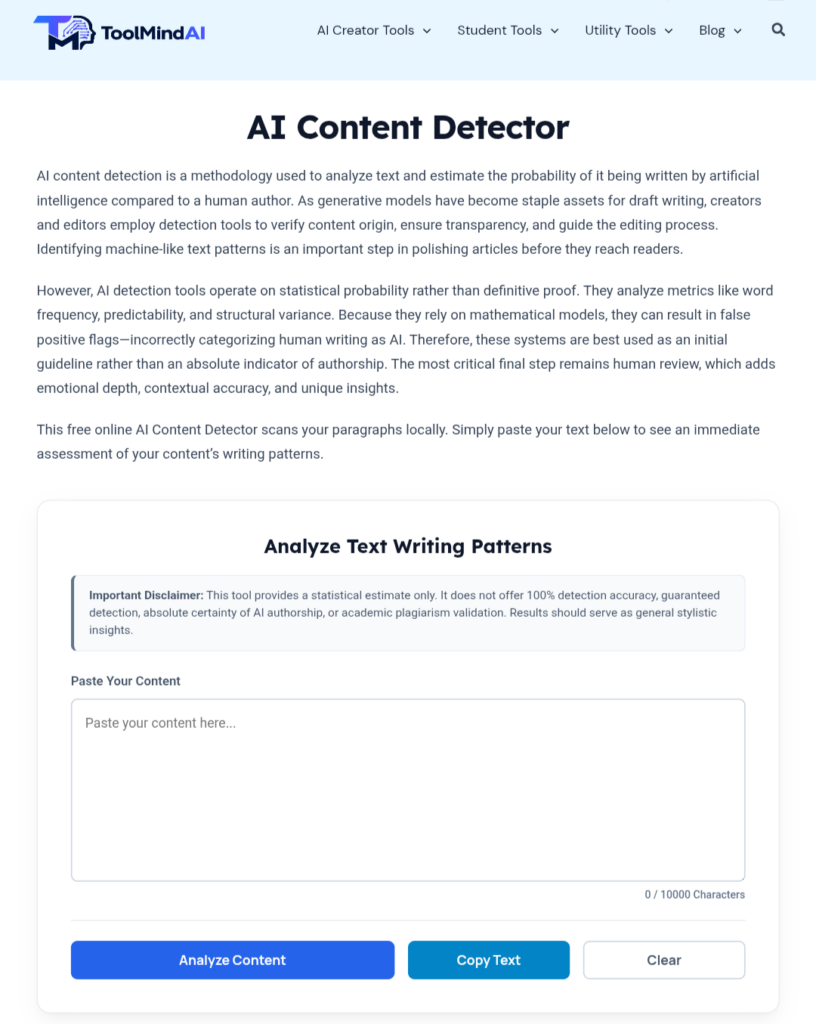
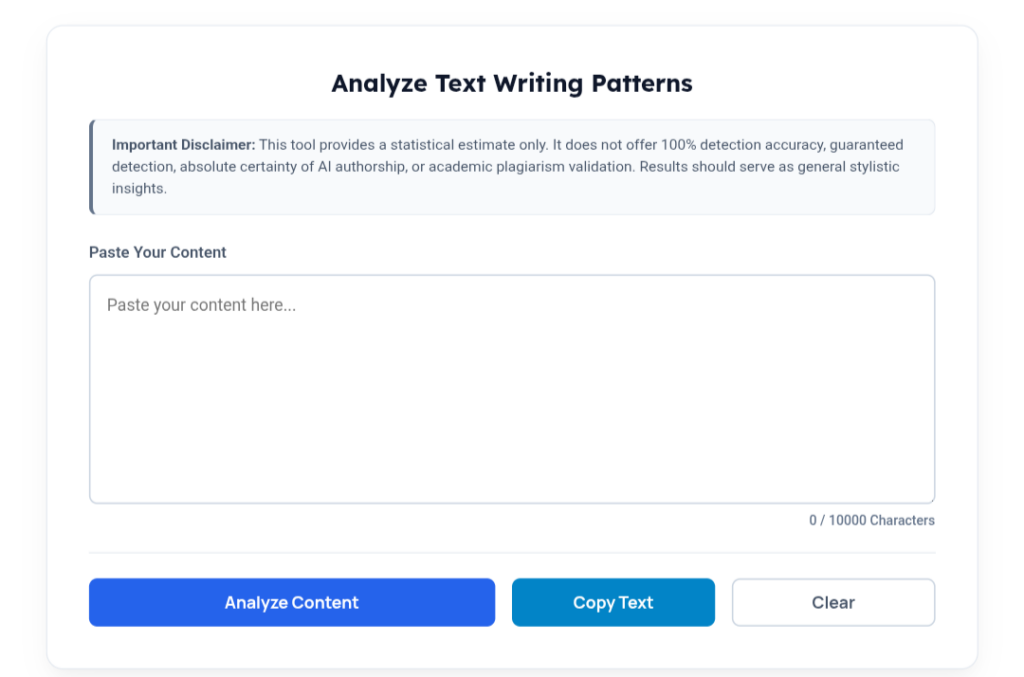
Visit the ToolMindAI website and navigate to the AI Content Detector.
You’ll see a clean interface with a text editor where you can paste or type the content you want to analyze. Whether you’re reviewing a blog post, assignment, product description, or website copy, the process begins the same way.
Step 2 — Paste Your Content
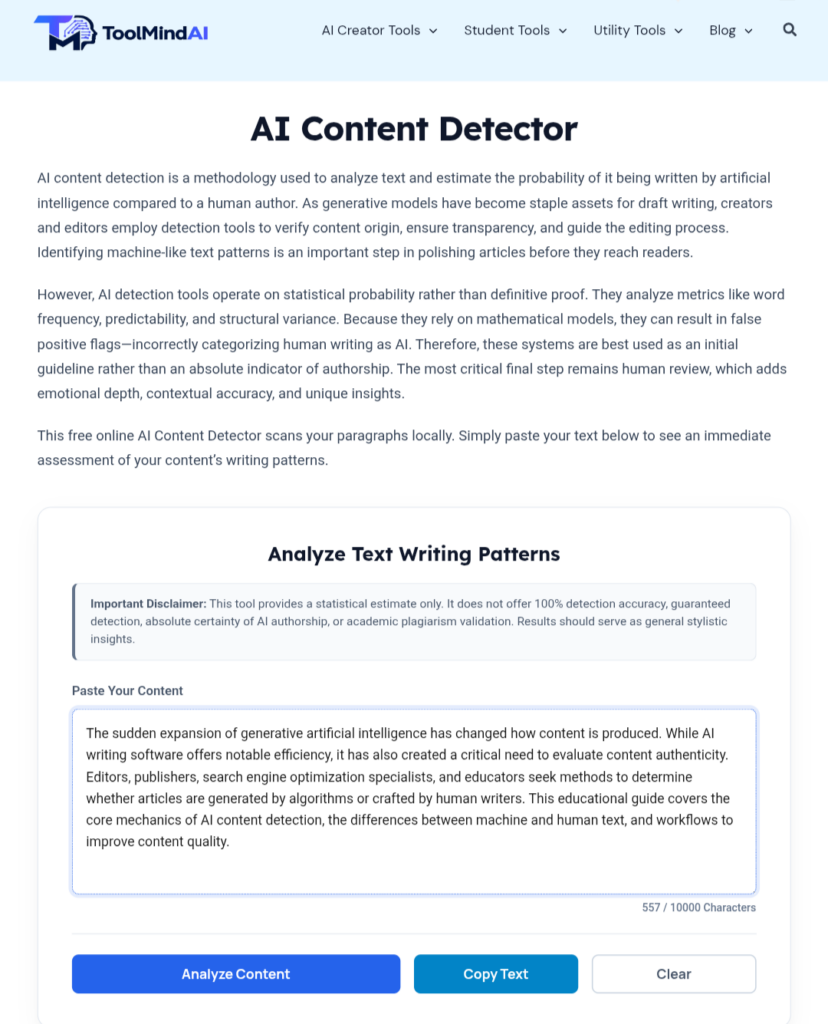
Copy the content you want to review and paste it into the editor. The tool supports many different types of writing, including:
- Blog posts,
- Student assignments,
- Website content,
- Marketing copy,
- Product descriptions,
- Emails,
- Social media captions.
Before running the analysis, take a quick moment to ensure the correct version of your content has been pasted.
Step 3 — Click Analyze Content
Once your content has been added, click the Analyze Content button.
The detector will begin examining:
- Sentence structure,
- Language patterns,
- Vocabulary diversity,
- Readability,
- Writing consistency.
Most analyses are completed within a few seconds, depending on the length of the content.
Step 3 — Understanding AI Detection Results
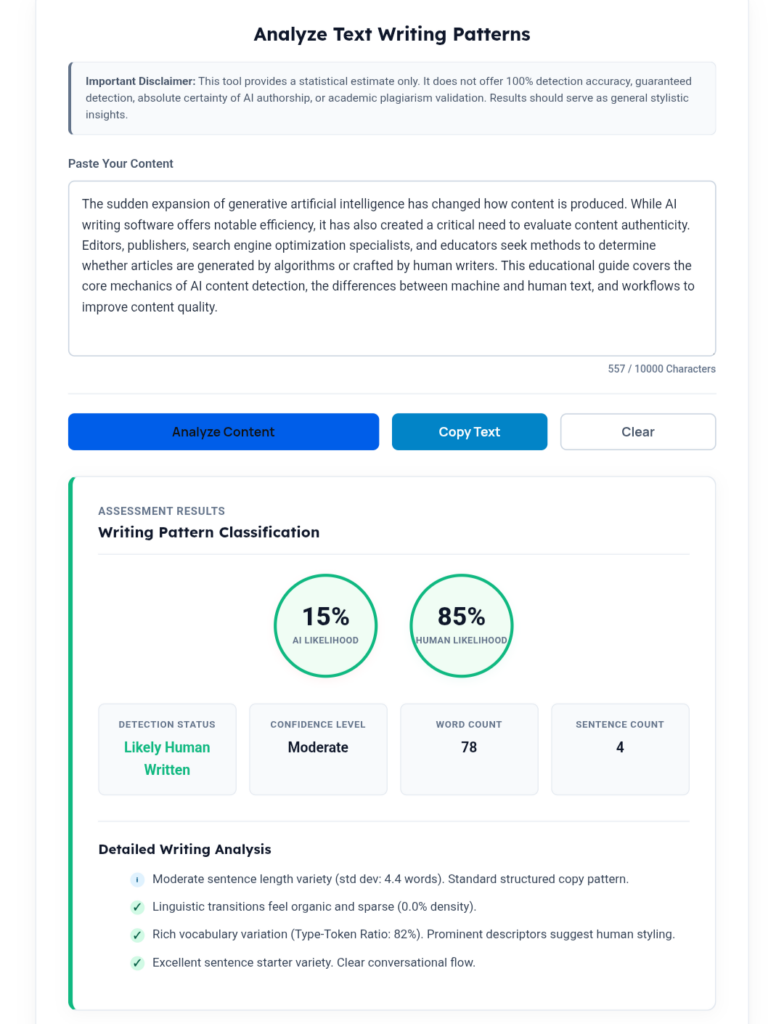
Once the analysis is complete, ToolMindAI presents the results in a clear, easy-to-understand report. Depending on future updates, your report may include several metrics designed to help you evaluate the overall quality of your writing.
These may include:
- AI Probability Score,
- Human Writing Estimate,
- Readability Score,
- Overall Analysis,
- Writing Suggestions.
At first glance, many users focus only on the AI percentage. While that number is interesting, it isn’t the most important part of the report.
The real value lies in the insights that help you improve your writing before publishing.
What Does the AI Score Actually Mean?
One of the biggest misconceptions about AI Content Detectors is that the AI score is a pass-or-fail grade.
It isn’t.
The score is simply an estimate based on writing characteristics observed during the analysis.
For example:
A higher AI probability may indicate:
- Repetitive sentence structures,
- Predictable vocabulary,
- Uniform paragraph lengths,
- Formulaic writing patterns.
A lower AI probability may suggest:
- Greater sentence variety,
- More natural language flow,
- Better transitions,
- Increased vocabulary diversity.
Neither result automatically determines whether your article is “good” or “bad.”
Instead of asking,
“How do I get 0% AI?”
Ask yourself,
“How can I make this article more useful for my readers?”
That’s the mindset that consistently leads to stronger, higher-quality content.
Remember: No AI Content Detector Is Perfect
One of the most important things to understand about AI Content Detectors is that no tool can guarantee completely accurate results in every situation.
AI writing technology continues to evolve rapidly, and AI detection methods are evolving alongside it. Because both technologies are constantly improving, there is no universal standard that every detector follows. As a result, different tools may analyze the same article differently and produce different estimates.
For example:
- A completely human-written article may receive a relatively high AI estimate because it uses repetitive sentence structures or a highly formal writing style.
- An AI-assisted article that has been carefully edited, fact-checked, and personalized may appear much more natural and receive a lower AI estimate.
This is why AI Content Detectors should always be viewed as editing assistants rather than decision-makers.
Instead of relying solely on one percentage or score, combine AI detection with:
- Manual proofreading,
- Fact-checking,
- Personal expertise,
- Reader feedback,
- Careful editing.
The strongest content is created through thoughtful human review—not by chasing the lowest possible AI score.
AI detection and plagiarism detection solve different problems. After reviewing AI writing patterns, it’s also worth checking whether your content is original using our Plagiarism Checker Lite.
Responsible AI systems should support human judgment rather than replace it, which aligns with guidance from the National Institute of Standards and Technology (NIST).
Improving Your Content Naturally
Once you’ve reviewed your AI detection report, the next step is improving your writing.
The objective isn’t to “beat” an AI detector.
The objective is to create content that is:
- Helpful,
- Accurate,
- Easy to read,
- Well-organized,
- Valuable for your audience.
Below are several practical techniques that consistently improve writing quality.
✔ Add Your Own Experience
Readers trust content that includes genuine experience and practical insights.
Instead of writing:
AI writing tools are helpful.
Consider writing:
While creating educational guides for ToolMindAI, I often use AI to generate an initial outline. Before publishing, I rewrite important sections, verify every fact, add screenshots, and include practical examples based on real testing.
Personal observations make articles more relatable and strengthen trust with readers.
✔ Improve Sentence Variety
Articles become monotonous when every sentence follows the same structure.
Good writing naturally alternates between:
- Short sentences,
- Medium-length explanations,
- Longer descriptive paragraphs.
This variation creates a smoother reading experience and keeps readers engaged.
✔ Reduce Repetition
Repeating the same keyword or phrase too frequently makes content feel mechanical.
Instead of repeating identical wording throughout an article, use natural variations where appropriate.
For example:
Instead of always writing:
AI Content Detector
You can occasionally use:
- AI detection tool,
- content analysis tool,
- writing analysis software,
- AI writing detector.
Natural variation improves readability while maintaining SEO.
✔ Strengthen Transitions
Readers should move smoothly from one section to the next. Instead of abruptly changing topics, explain how each idea connects.
For example:
Instead of:
Here’s another feature.
Try:
Once you’ve understood how AI detection works, the next step is learning how to improve the content based on those insights.
Small improvements like this create a more natural flow.
✔ Verify Every Important Fact
AI tools can occasionally produce outdated or inaccurate information.
Before publishing, verify:
- Statistics,
- Dates,
- Company names,
- Product features,
- Technical information,
- External references.
Accurate information builds long-term credibility.
✔ Write for People First
This is the most important recommendation in this guide.
Instead of asking:
“Will an AI detector like this article?”
Ask:
“Will this article genuinely help someone solve their problem?”
That simple shift in mindset leads to clearer explanations, better examples, and more useful content. Google’s guidance also emphasizes creating helpful, reliable, people-first content rather than writing primarily for search engines. Once you’ve finished editing your article, don’t forget to create a compelling SEO description using our Meta Description Generator before publishing.
Google recommends creating helpful, reliable, people-first content that prioritizes the needs of readers rather than writing primarily for search engines.
Common Mistakes to Avoid
Many beginners misunderstand how AI Content Detectors should be used.
Avoid these common mistakes:
❌ Publishing AI-generated content without reviewing it.
❌ Treating the AI score as a final judgment.
❌ Trying to achieve 0% AI instead of improving content quality.
❌ Ignoring readability and sentence flow.
❌ Forgetting to verify important facts.
❌ Overusing keywords for SEO.
❌ Writing primarily for search engines instead of readers.
❌ Skipping proofreading before publishing.
Avoiding these mistakes will improve both your content quality and your readers’ experience.
Best Practices Checklist
Before publishing your article, ask yourself:
✅ Does this article answer the reader’s question?
✅ Is every important fact accurate?
✅ Have I added practical examples or personal insights?
✅ Is the writing clear and easy to understand?
✅ Have I improved repetitive sections?
✅ Have I included helpful internal links?
✅ Have I optimized my SEO title and meta description?
✅ Would I find this article genuinely useful if I were the reader?
If you answered “Yes” to each question, your content is likely ready to publish.
The Future of AI Content Detection
AI writing and AI detection technologies continue to develop at a rapid pace.
Future AI Content Detectors are expected to become better at understanding:
- Writing context,
- Author intent,
- Brand voice,
- Audience expectations,
- Long-form content consistency,
- Multilingual writing patterns.
At the same time, AI writing tools will continue to improve.
Because both technologies evolve together, responsible editing and thoughtful human review will remain essential. Rather than replacing writers, AI Content Detectors will increasingly serve as intelligent editing assistants that help creators produce clearer, more engaging content.
Key Takeaways
Here’s what we’ve learned:
- AI Content Detectors analyze writing patterns rather than checking plagiarism.
- Detection scores are estimates—not definitive proof.
- The best results come from combining AI analysis with careful human editing.
- Readability, originality, and helpfulness matter more than achieving a particular AI score.
- Personal experience, accurate information, and thoughtful editing create stronger content.
- AI Content Detectors are valuable writing assistants—but human judgment remains essential.
When used responsibly, AI Content Detectors can help writers create clearer, more engaging, and more trustworthy content.
Related AI Tools
Explore more writing tools on ToolMindAI:
- AI Humanizer — Improve AI-assisted writing while preserving your original meaning.
- Plagiarism Checker Lite — Check originality and distinguish plagiarism detection from AI detection.
- Readability Score Checker — Evaluate sentence complexity and improve readability.
- Meta Description Generator — Create SEO-friendly meta descriptions for your articles.
- AI Prompt Generator — Generate better prompts for ChatGPT and other AI assistants.
Frequently Asked Questions
1. What is an AI Content Detector?
An AI Content Detector analyzes writing patterns and estimates whether text contains characteristics commonly associated with AI-generated writing.
2. How does an AI Content Detector work?
It examines sentence structure, vocabulary diversity, readability, writing rhythm, and language patterns using Natural Language Processing (NLP) and other language analysis techniques.
3. Can AI Content Detectors guarantee accurate results?
No. They provide estimates based on writing characteristics and should always be used alongside human review.
4. Should students use AI Content Detectors?
Yes. Students can use them to review AI-assisted drafts, improve readability, and better understand their writing while following their institution’s academic integrity policies.
5. Does Google penalize AI-generated content?
Google’s guidance focuses on creating helpful, reliable, people-first content. The quality and usefulness of the content are more important than whether AI assisted in its creation.
6. What’s the difference between AI detection and plagiarism detection?
AI detection analyzes writing patterns, while plagiarism detection compares content against published sources to identify similarities.
7. Can editing improve AI-assisted writing?
Yes. Improving sentence variety, adding personal insights, verifying facts, and refining transitions often results in clearer, more engaging content.
8. Who benefits from AI Content Detectors?
Students, bloggers, freelancers, marketers, businesses, agencies, educators, and anyone who wants to improve their writing before publishing.
9. Is ToolMindAI AI Content Detector free?
Yes. ToolMindAI offers a browser-based AI Content Detector that allows users to analyze their writing without installing software. (Adjust this if your pricing or access changes.)
10. What should I do after checking my content?
Review the report carefully, improve your writing where needed, verify important facts, optimize your SEO, proofread the final draft, and publish only when you’re confident the content provides genuine value.
Final Thoughts
AI Content Detectors are most valuable when they are viewed as writing assistants rather than judges.
Their purpose isn’t to label your work—it is to help you identify opportunities to improve clarity, readability, and overall writing quality.
By combining AI analysis with thoughtful editing, personal experience, careful fact-checking, and a reader-first mindset, you can consistently create content that is more engaging, trustworthy, and genuinely useful.
Whether you’re a student preparing assignments, a blogger publishing educational guides, a freelancer delivering client work, or a business creating website content, learning how to use an AI Content Detector effectively will help you become a stronger writer—not simply a better AI user.
Google also recommends creating content primarily to help people rather than to manipulate search rankings. Focusing on originality, expertise, and usefulness aligns your writing with long-term best practices.
Continue Learning with ToolMindAI
If you found this guide helpful, you may also enjoy these related resources:
- AI Humanizer,
- Plagiarism Checker Lite,
- Readability Score Checker,
- Meta Description Generator,
- AI Prompt Generator,
- AI Writing Tips for Students,
- Best AI Tools for Content Creators.
Explore ToolMindAI’s growing collection of AI tools and educational guides designed to help students, professionals, creators, and businesses produce higher-quality content more efficiently.
Great guide! Easy to understand and very helpful for beginners. Thanks for sharing!
Thank you for your kind words! Glad you found the guide helpful.