
A meta description is a short summary that helps explain what a webpage is about in search results. A well-written description can make your page more useful and appealing to people deciding which result to visit. But writing an effective meta description is about more than simply inserting keywords.
In this guide, you’ll learn what a meta description is, where it appears, why it matters, how to write one effectively, how long it should be, and how to create descriptions that accurately match search intent.
A meta description is a short HTML summary of a webpage that search engines may use when displaying a search-result snippet. A good meta description accurately describes the page, matches search intent, and helps users understand what they can expect before visiting.
Quick Answer: What Is a Meta Description?
A meta description is an HTML element that provides a brief summary of a webpage. Search engines may use it as the text shown beneath a page title in search results. A good meta description clearly communicates what the page offers and gives searchers a reason to click.
Key Takeaways
- A meta description summarizes the content of a webpage.
- Google may use your meta description when generating a search-result snippet, but it can also choose text directly from the page.
- There is no fixed character limit for meta descriptions.
- Write for people first rather than filling the description with keywords.
- Make descriptions accurate, specific, and relevant to the page.
- Each important page should ideally have a unique description.
- A good meta description should match the searcher’s intent and accurately represent the page.
What Is a Meta Description?
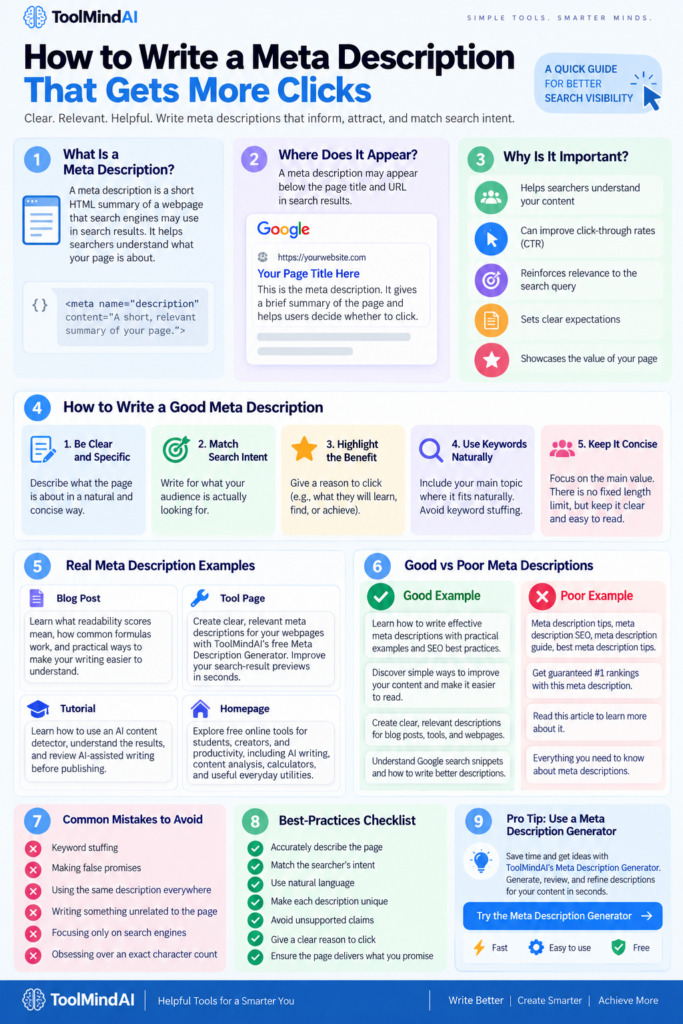
A meta description is a piece of HTML metadata that describes the content of a webpage. It isn’t normally visible within the main body of the page, but search engines can use it when creating search-result snippets.
A typical meta description looks like this in HTML:
<meta name="description" content="Learn how to write effective meta descriptions that accurately describe your content and encourage searchers to visit your page.">Think of it as a short preview of your webpage.
For example, if you publish an article about improving website readability, a useful description might explain that the article covers readability scores, common formulas, and practical ways to make writing easier to understand.
The goal isn’t to summarize every section. Instead, the description should give a concise and accurate indication of what the visitor will find after clicking.
Where Does a Meta Description Appear?
You normally won’t see the meta description while reading a webpage itself.
Instead, it may appear as part of a search-result snippet underneath the page title and URL.
For example:
How to Improve Website Readability
Learn practical ways to improve your readability score, simplify sentences, and make online content easier for your audience to understand.
However, there is an important detail: Google doesn’t always display the meta description you provide.
Google explains that it primarily creates snippets from the actual content on a page and may use the meta description when it provides a more accurate description of the page.
This means your meta description should work together with your actual page content rather than trying to manipulate what Google displays.
Why Are Meta Descriptions Important?
A meta description can help searchers quickly understand whether a page is relevant to their query.
Imagine someone searches for:
how to improve readability score
They may see several results with similar titles. A clear description can help communicate what makes your page useful.
For example:
Less useful:
Read this article to learn more about readability and writing.
More useful:
Learn how readability scores work, what makes a good score, and practical ways to make your writing clearer and easier to read.
The second description gives the reader considerably more information about what to expect.
Meta descriptions can help with:
- Communicating the page’s purpose
- Reinforcing relevance to a search query
- Setting expectations before someone clicks
- Making search-result previews more informative
- Highlighting the practical value of your content
However, don’t treat the meta description as a guaranteed ranking lever. Google doesn’t say that simply adding a keyword to a meta description will improve rankings. The priority should be accurate, useful descriptions that represent the page well.
Your meta description is only one part of a well-structured page. The content itself should also be clear and easy to understand. Learn more about what a readability score means and how readability can be improved in our complete beginner’s guide.
Google’s guidance also recommends creating unique, descriptive meta descriptions rather than producing repetitive or keyword-heavy descriptions across pages.
How to Write a Good Meta Description
Writing a strong meta description becomes much easier when you focus on the reader’s question:
“What will I get if I click this result?”
Use the following principles.
1. Clearly Describe the Page
Start by explaining what the visitor will find.
For an article about readability, you could write:
Learn what readability scores mean, how common readability formulas work, and how to make your writing easier to understand.
The reader immediately knows what the article covers.
2. Match Search Intent
Your description should reflect what people are actually looking for. If the page is a tutorial, mention what the reader will learn or accomplish.
For example:
Learn how to calculate and improve your readability score with practical examples, writing tips, and a simple step-by-step workflow.
This is more useful than a generic statement such as:
Everything you need to know about readability scores.
3. Highlight the Benefit
Give the reader a reason to continue.
Instead of:
Meta descriptions are important for websites.
Try:
Learn how to write clearer meta descriptions that accurately summarize your pages and help searchers understand what to expect.
The second version communicates a specific benefit without making an unrealistic promise.
4. Use Your Main Topic Naturally
If your page targets a specific search query, mentioning the topic naturally can help make the description more relevant to the reader.
For example:
Learn how to write a meta description with practical examples, SEO best practices, and tips for creating clearer search-result previews.
Notice that the keyword isn’t repeated several times.
One natural mention is generally enough.
How Long Should a Meta Description Be?
This is one of the most common SEO questions.
You may have heard that every meta description should be exactly 150–160 characters.
That’s an oversimplification.
Google’s current documentation states that there is no fixed length limit for the meta description element. Search-result snippets can be truncated depending on factors such as the device and available display space.
So instead of obsessing over an exact character count, focus on making the description:
- Concise.
- Useful.
- Accurate.
- Specific.
- Easy to understand.
As a practical writing guideline, keeping your main message relatively compact is still sensible because only part of a description may be visible in a search result.
A better approach
Don’t ask:
“How do I make this exactly 160 characters?”
Ask:
“Can a searcher understand the value of this page in one quick glance?”
That’s a much more useful standard.
Suppose you have a page titled:
Weak description
Readability score is an important topic. Read this article to learn more about it.
Better description
Learn what a readability score means, how common readability formulas work, what makes a good score, and how to improve your writing.
The second version communicates the article’s actual value and closely matches the page’s search intent.
Meta Description Examples for Different Types of Pages
A good meta description depends on the type of page you’re describing. A blog article, homepage, tool page, and tutorial may all need different approaches.
Blog Post
Page: What Is a Readability Score?
Learn what readability scores mean, how common readability formulas work, and practical ways to make your writing clearer and easier to understand.
Tool Page
Page: Meta Description Generator
Create clear, relevant meta descriptions for your webpages with ToolMindAI’s free Meta Description Generator. Improve your search-result previews in seconds.
Tutorial
Page: How to Use an AI Content Detector
Learn how AI content detectors analyze writing, how to interpret their results, and how to review AI-assisted content before publishing.
Homepage
A homepage description should communicate what the website offers rather than describe one specific article.
Explore free online tools for students, creators, and productivity, including AI writing, content analysis, calculators, and useful everyday utilities.
The key principle is specificity. Your description should tell searchers what the page actually provides.
Good vs Poor Meta Descriptions
| Poor Approach | Better Approach |
|---|---|
| Uses vague language | Clearly explains the page |
| Repeats keywords | Uses the topic naturally |
| Makes unrealistic promises | Sets accurate expectations |
| Uses the same description everywhere | Creates unique descriptions |
| Tries to summarize the entire page | Highlights the main value |
| Focuses only on search engines | Writes for potential visitors |
A meta description doesn’t need to sound like an advertisement. In many cases, a straightforward explanation of the page is more effective.
Meta Description vs Google Search Snippet
These terms are often confused, but they aren’t exactly the same. A meta description is information provided by the website in the HTML of a page. A search-result snippet is the description Google chooses to display for a particular search.
Google may use the meta description, but it can also generate a snippet from the visible content on the webpage when that appears more useful for the search query. Google’s documentation on search-result snippets explains how this process works and how website owners can influence the information shown in search results.
. This distinction is important because you shouldn’t assume that changing your meta description will always change the text Google displays.
Think of it this way:
Your website:
Provides a meta description.
Google:
Decides what snippet may be most useful for the searcher. Therefore, your actual page content matters just as much as the metadata.
Does a Meta Description Affect SEO?
A meta description is an important part of webpage metadata, but you shouldn’t treat it as a direct ranking shortcut.
Google can generate search snippets from page content and may use the meta description when it provides a better summary.
The practical goal should therefore be:
Create an accurate description that helps the right searcher understand your page.
Don’t stuff keywords into the description simply because you think it will improve rankings.
Instead, focus on:
- Search intent.
- Accuracy.
- Relevance.
- Clarity.
- User expectations.
- A useful description of the page.
For broader SEO writing, you can also review your article’s readability after optimizing its metadata. The Readability Score Checker can help you evaluate whether your writing is easy for your intended audience to understand.
How to Write Meta Descriptions for Different Pages
Different pages require different approaches.
Blog Articles
Focus on the problem, information, or question the article answers.
Learn how readability scores work, explore common formulas, and discover practical ways to make your writing easier to understand.
Tool Pages
Focus on what the tool does and who can benefit from it.
Generate concise meta descriptions for blog posts, webpages, and other content with a free online meta description generator.
Tutorials
Focus on the outcome.
Learn how to use an AI content detector, understand AI probability results, and review AI-assisted writing before publishing.
Category Pages
Explain what visitors will find within the category.
Explore practical tutorials covering AI tools, writing, content creation, productivity, and other useful online tools.
The description should always accurately reflect the page rather than trying to target every possible keyword.
How to Use the ToolMindAI Meta Description Generator
Writing descriptions manually is useful, but generating several variations can take time. This is where a Meta Description Generator can help.
Step 1: Open the Tool
Open the ToolMindAI Meta Description Generator.
Step 2: Provide Your Page Information
Enter the relevant information about the page, such as its topic, title, or main content.
The more clearly you describe the page, the easier it is to create a useful starting point.
Step 3: Generate a Description
Use the tool to create a draft description.
Don’t treat the generated text as automatically perfect. Read it and check whether it accurately represents the page.
Step 4: Edit Before Publishing
Review the generated description for:
- Accuracy,
- Clarity,
- Relevance,
- Natural language,
- Search intent,
- Unnecessary repetition,
- Unsupported claims.
A generator should be a writing aid, not a replacement for editorial judgment.
How to Improve an AI-Generated Meta Description
AI can produce descriptions quickly, but the first version may be generic.
For example:
AI-generated draft:
Discover everything you need to know about meta descriptions in this comprehensive guide that provides useful information and tips.
This isn’t necessarily wrong, but it doesn’t tell the searcher enough.
A more useful version might be:
Learn how to write effective meta descriptions, understand Google’s search snippets, and create clear descriptions for blogs, tools, and webpages.
The second version communicates the actual content more clearly.
If you’re working extensively with AI-generated writing, you can also review the overall text with an AI Content Detector and improve its readability. Once you’ve refined your description and page content, you can use the Readability Score Checker to review whether your writing is clear and easy for your intended audience to understand.
If you’re working with AI-assisted content beyond the meta description itself, you can also learn how to review it with an AI Content Detector before publishing.
Common Meta Description Mistakes
1. Keyword Stuffing
Avoid repeating the same keyword several times. Repeating keywords unnaturally can make text difficult to read and may fall under Google’s definition of keyword stuffing. Google’s Search spam policies specifically warn against excessive repetition of keywords or phrases.
Poor:
Meta description tips, meta description SEO, meta description guide, best meta description tips.
This doesn’t read naturally.
2. Making False Promises
Avoid claims such as:
Get guaranteed #1 Google rankings with this meta description.
A meta description cannot guarantee a ranking position.
Another common issue is publishing AI-assisted text without reviewing whether it sounds natural or genuinely reflects the page. If you regularly work with AI-generated writing, understanding how AI humanizers work can help you make more informed decisions about natural phrasing, sentence flow, and content editing.
3. Using the Same Description Everywhere
Important pages should have descriptions that actually reflect their individual content.
4. Writing Something Unrelated to the Page
If the description promises a tutorial but the page contains something completely different, the searcher gets a poor experience.
5. Obsessing Over Character Count
Don’t sacrifice clarity simply to hit an arbitrary character limit.
6. Writing Only for Search Engines
The person reading the search result is your audience. Write something they can understand quickly.
Meta Description Best-Practices Checklist
Before publishing a page, ask:
- Does the description accurately describe the page?
- Does it match the searcher’s likely intent?
- Is the main topic clear?
- Is the language natural?
- Is the description unique where appropriate?
- Have unnecessary keywords been removed?
- Does it avoid unsupported claims?
- Does it give the reader a reason to consider the page?
- Does the page itself deliver what the description promises?
If you can answer yes to these questions, your description is in good shape.
A Simple Meta Description Workflow
You can use this five-step process whenever you publish a new page:
1. Understand the search intent
What does the visitor want?
↓
2. Identify the page’s main value
What will they learn, find, or accomplish?
↓
3. Write a concise description
Explain that value naturally.
↓
4. Review the wording
Remove unnecessary keywords and vague claims.
↓
5. Compare it with the actual page
Make sure the description accurately represents the content.
For AI-assisted workflows, you can use a generator for the first draft and then manually refine it.
Frequently Asked Questions
What is a good meta description?
A good meta description is concise, accurate, relevant to the page, and written in natural language. It should help searchers understand what they can expect from the webpage.
How long should a meta description be?
There is no fixed character limit specified by Google. Search snippets can be truncated depending on the available space, so focus on communicating the main value clearly rather than targeting an exact number.
Does a meta description improve Google rankings?
A meta description should not be treated as a direct ranking shortcut. Google may use it when generating a search snippet, but it can also use text from the webpage itself.
Should every page have a unique meta description?
For important pages, unique descriptions are generally preferable because they can accurately describe each page’s specific content and purpose.
Can AI write meta descriptions?
Yes. AI tools can help create draft descriptions, but you should review the output for accuracy, relevance, clarity, and whether it properly represents the page.
Should I use keywords in a meta description?
You can mention the page’s main topic naturally when appropriate. Avoid repeating keywords or creating a list of search terms.
Final Thoughts
A meta description is a small piece of information, but it plays an important role in communicating what your webpage is about.
The best approach isn’t to chase an exact character count or repeatedly insert keywords. Instead, create a clear, accurate, useful description that matches the page and the searcher’s intent.
Use a generator when it saves time, but always review the result before publishing. Your webpage itself should then deliver the information or experience promised by the description.
For a complete content workflow, combine good metadata with clear writing, strong page structure, and useful information. You can also use ToolMindAI’s Readability Score Checker to review your writing before publishing.
Continue Learning with ToolMindAI
- Readability: Learn what a readability score is and how to make your content easier to understand.
- AI Content: Learn how to use an AI Content Detector and understand its results.
- AI Writing: Discover how AI Humanizers work and how they can assist with AI-assisted writing.