
Instagram content is more than attractive photos and short videos. A well-written caption helps explain your message, communicate your personality, give useful information, and encourage people to take the next step. But writing fresh captions for every post, Reel, or carousel can be time-consuming.
AI writing tools can simplify this process. With a clear prompt, you can generate caption ideas, explore different writing styles, create product descriptions, and turn a basic idea into a more engaging social media post.
However, using AI does not automatically produce a good caption. The best results come from combining specific instructions with your own experience, audience knowledge, and careful editing.
In this guide, you’ll learn how to write Instagram captions with AI, discover practical prompts and examples, avoid common mistakes, and improve AI-generated captions before publishing them.
Quick Answer: How Do You Write Instagram Captions with AI?
To write Instagram captions with AI, describe your post, target audience, goal, preferred tone, and desired call to action. Ask an AI writing tool to generate several caption options, choose the most relevant draft, and edit it to match your message and personality. Add useful keywords naturally, format the caption for easy reading, and verify all factual claims before publishing.
You can also try the ToolMindAI Instagram Caption Generator to generate caption ideas for different types of Instagram content.
Key Takeaways
- Give AI a specific description of your post instead of using a vague instruction.
- Match the caption to the content format, audience, and purpose.
- Use a strong opening line to communicate why the post matters.
- Add relevant keywords naturally without repeating them excessively.
- Include one clear call to action when appropriate.
- Edit AI-generated text to remove generic phrases and add authentic details.
- Review the final caption before publishing it.
What Is an AI Instagram Caption?
An AI Instagram caption is text created or improved with the help of an artificial intelligence writing tool. It can describe a photo, introduce a product, explain a tutorial, tell a short story, or encourage readers to interact with a post.
For example, imagine you’re sharing a photograph of a cup of coffee.
A basic caption might be:
“Enjoying my coffee today.”
An AI writing tool could offer a more descriptive alternative:
“Slow mornings, freshly brewed coffee, and a few quiet moments before the day begins. What’s your favourite way to start the morning?”
The second example provides more context and invites a response. Whether it performs better depends on the audience, visual content, and purpose of the post; no caption can guarantee engagement.
AI caption generators can help with several tasks:
- Creating caption ideas from a short description.
- Rewriting captions in a different tone.
- Generating product and promotional copy.
- Suggesting opening lines and questions.
- Drafting captions for Reels, carousels, and photographs.
- Improving clarity, readability, and sentence flow.
- Brainstorming relevant keywords and hashtags.
The purpose is to make the writing process easier, not to remove human judgment from content creation.
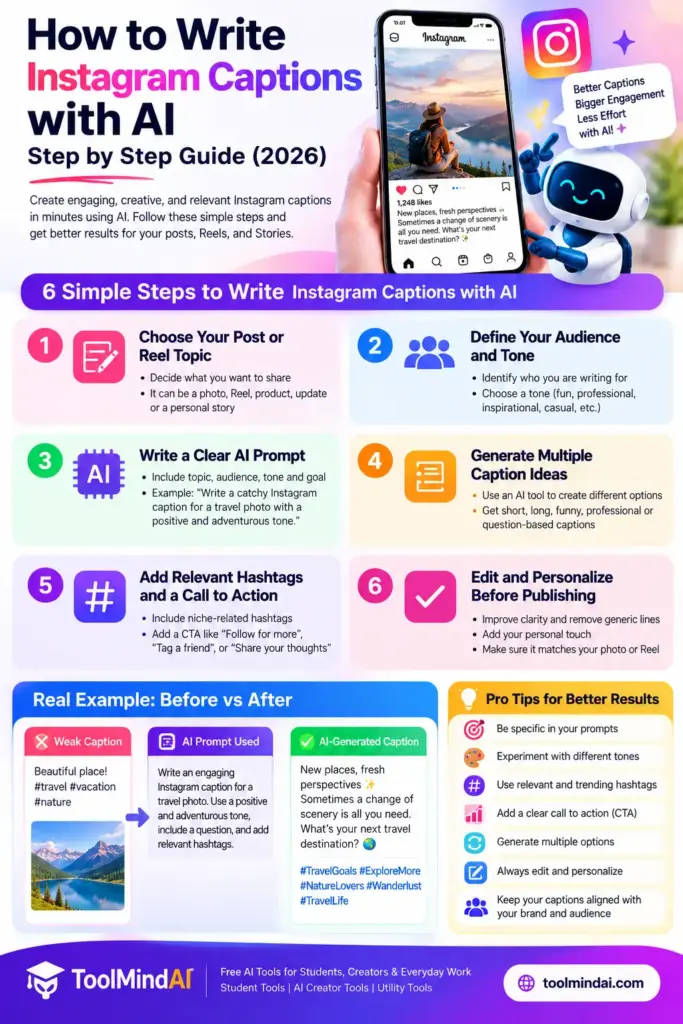
How to Write Instagram Captions with AI: Step by Step
Step 1: Decide What Your Instagram Post Should Achieve
Before generating a caption, determine the main purpose of the post.
Different objectives require different writing approaches.
| Goal | Suitable caption approach |
|---|---|
| Share information | Explain the main idea clearly |
| Encourage discussion | Ask a relevant, easy-to-answer question |
| Promote a product | Explain its features and practical benefits |
| Share a personal moment | Use a natural, conversational tone |
| Teach something | Introduce the problem and provide useful steps |
| Encourage website visits | Explain what readers will find at the destination |
Avoid asking one caption to achieve too many goals. A focused message is usually easier for readers to understand.
Step 2: Describe Your Content Clearly
AI can only work with the information you provide and the patterns it has learned. If your prompt contains little detail, the result may sound generic.
Instead of writing:
“Create an Instagram caption.”
Try:
“Write an Instagram caption for a photograph of a homemade chocolate cake. The audience is people who enjoy baking at home. Use a warm, friendly tone, mention the rich chocolate flavour, and end with a question asking readers about their favourite cake.”
The second prompt provides the subject, audience, tone, and desired ending.
Include these details whenever they are relevant:
- What appears in the photo or video.
- Who the content is intended for.
- What you want the reader to understand or do.
- The tone and style you prefer.
- Any factual details that must be included.
- The approximate length or format you want.
If you need help creating clearer instructions, try the AI Prompt Generator to develop a more specific prompt.
For another practical approach to caption prompts, see Meta AI’s guide to writing Instagram captions with AI.
Step 3: Generate Several Caption Options
Don’t automatically accept the first response.
Ask the tool to produce three alternatives with different approaches. For example:
- A short and simple caption.
- A conversational caption with a question.
- A storytelling caption with more context.
Compare the options and select the one that best represents the content. You can also combine useful parts from different drafts.
Step 4: Add a Strong Opening Line
The opening line should quickly communicate the subject, offer a useful idea, or create a relevant reason to continue reading.
For example:
Generic opening: “Here is a new post about productivity.”
More specific opening: “Your to-do list may be getting longer because your priorities aren’t clear.”
The second opening introduces a recognizable problem and gives readers a reason to continue.
You can ask AI to generate several opening lines and then select one that accurately reflects the post. Avoid exaggerated claims, misleading curiosity gaps, or promises that the content cannot fulfil.
Step 5: Make the Caption Easy to Read
Long captions can be useful when a post needs a story, explanation, or tutorial. However, dense blocks of text can make that information harder to scan.
Improve readability by:
- Keeping paragraphs focused on one idea.
- Using line breaks where they help.
- Removing unnecessary introductory sentences.
- Replacing complicated words with clear alternatives when appropriate.
- Using emojis only when they support the tone.
- Keeping lists short and relevant.
There is no single ideal caption length for every Instagram post. Choose a length that suits the subject and gives readers enough information without unnecessary repetition.
Step 6: Add Relevant Keywords Naturally
Use words that accurately describe the subject of your post.
For a post about home gardening, relevant terms might include “container gardening,” “indoor plants,” or “beginner gardening tips.”
A natural sentence could be:
“Starting a small indoor garden? These beginner-friendly plants are a simple way to bring more greenery into your home.”
Avoid repeating the same keyword unnaturally. The caption should be useful to people first, with relevant terminology included where it fits.
For longer captions, a readability score checker can help you review how easy the text may be to read.
Step 7: Finish with a Suitable Call to Action
A call to action (CTA) tells readers what they can do next.
Examples include:
- “Which plant would you choose?”
- “Save this guide for your next project.”
- “Share your favourite recipe in the comments.”
- “Explore the full collection through the link in our bio.”
- “What would you add to this list?”
Use a CTA that matches the post’s objective. An educational post might invite readers to save a checklist, while a product post might direct them to a relevant product page.
Step 8: Edit and Review Before Publishing
Read the final caption as if you were seeing the post for the first time.
Check whether it accurately describes the visual, sounds natural, and gives readers something useful. Remove generic expressions, unsupported claims, and unnecessary hashtags.
Add real details that AI could not reliably know from a vague prompt, such as the actual product specifications, your personal experience, or the precise steps shown in a tutorial.
Your final caption should be something you are comfortable publishing under your own name or brand.
When an AI-generated caption sounds stiff, learn how to humanize AI text by improving its clarity, specificity, and natural flow.
15 AI Instagram Caption Examples and Prompts
The following examples demonstrate how to prompt an AI writing tool for different types of Instagram content. They are starting points you can adapt rather than guaranteed high-performing captions.
1. Lifestyle Photo Caption
Prompt:
Write a friendly Instagram caption for a lifestyle photograph showing a peaceful morning at home. Keep the tone warm and natural. Use one short opening line, add a little context, and end with a simple question.
Example caption:
“Some mornings are best enjoyed slowly. A quiet cup of coffee, a little sunshine, and time to reset before the day begins. What’s one small thing that makes your morning better?”
2. Travel Caption
Prompt:
Create a travel caption for a photograph of a mountain landscape. Make it descriptive and reflective without inventing a location or personal experience. Keep the wording easy to read.
Example caption:
“Fresh air, open skies, and a view that makes you pause for a moment. Sometimes a change of scenery is all you need. Which destination is on your travel wish list?”
3. Food Photography Caption
Prompt:
Write an appetizing Instagram caption for a photograph of homemade pasta. Mention its comforting appeal and use a conversational tone. End with a question about favourite pasta dishes.
Example caption:
“A comforting bowl of pasta can turn an ordinary evening into something special. Simple ingredients, plenty of flavour, and a meal worth slowing down for. What’s your favourite pasta dish?”
4. Product Promotion Caption
Prompt:
Write an Instagram caption introducing a reusable water bottle. Highlight convenience and reusability without making unsupported environmental or health claims. Use a friendly, informative tone.
Example caption:
“One bottle, fewer disposable bottles to think about. Keep your water close throughout the day with a reusable bottle designed for everyday routines. Explore the available styles and find the one that suits you.”
5. Small Business Caption
Prompt:
Create a warm Instagram caption for a small bakery announcing freshly prepared pastries. Keep it inviting, mention that customers can check today’s available selection, and avoid inventing prices or opening hours.
Example caption:
“Fresh pastries are ready for today’s little moments of happiness. Stop by and see what’s available, whether you’re picking up breakfast or treating yourself to something sweet. Which pastry would you choose first?”
6. Educational Carousel Caption
Prompt:
Write an Instagram caption introducing a carousel containing five beginner tips for saving money. Explain what readers will learn and encourage them to save the post for later. Do not promise specific financial results.
Example caption:
“Want to become more intentional with your money? This carousel covers five simple habits that can help you review spending, plan purchases, and organize your monthly budget. Save it for your next budgeting session.”
7. Fitness Caption
Prompt:
Write a motivational caption for a beginner-friendly workout video. Emphasize consistency and choosing an appropriate level of activity. Avoid unrealistic transformation promises or medical claims.
Example caption:
“You don’t need a perfect workout to take a positive step. Start at a level that feels manageable, focus on good technique, and build consistency over time. What’s one movement you enjoy?”
8. Book Recommendation Caption
Prompt:
Create an Instagram caption recommending a book to readers who enjoy thoughtful stories. Leave placeholders for the book title and verified details rather than inventing a plot.
Example caption:
“Looking for your next read? [Book Title] might be worth adding to your list if you enjoy [verified theme or genre]. Have you read it already, or is it on your reading list?”
9. Fashion Caption
Prompt:
Write a stylish caption for an outfit photograph. Keep it concise and confident, mention versatility if supported by the image, and avoid exaggerated claims about the clothing.
Example caption:
“Simple pieces, endless ways to style them. Sometimes the best outfit is the one that feels comfortable and true to you. Would you wear this look casually or dress it up?”
10. Behind-the-Scenes Caption
Prompt:
Create a behind-the-scenes caption for a small business showing its packaging process. Make it personal and appreciative without inventing customer stories or order numbers.
Example caption:
“A little look behind the scenes as we prepare orders with care. Every detail matters, from checking the product to getting the package ready for its journey. Thanks for supporting our small business.”
11. Motivational Caption
Prompt:
Write an encouraging Instagram caption about making gradual progress toward a goal. Avoid clichés and unrealistic promises. Keep it grounded and conversational.
Example caption:
“Progress doesn’t always look dramatic. Sometimes it’s simply showing up, learning one new thing, and trying again tomorrow. What’s one small step you’re taking this week?”
12. Technology Caption
Prompt:
Write an informative caption introducing a productivity app. Use only the features supplied in the description, explain who might find it useful, and invite readers to learn more.
Example caption:
“Looking for a simpler way to organize your tasks? [App Name] offers [verified feature one] and [verified feature two] to help you manage your workflow. Explore its features and see whether it fits your routine.”
13. Seasonal Caption
Prompt:
Create a cheerful caption for a seasonal photograph. Keep the message relevant to the image, use a friendly tone, and avoid adding dates or event details that were not supplied.
Example caption:
“A new season brings a fresh reason to try something different. Whether it’s a new recipe, a weekend walk, or a little time outdoors, what are you looking forward to most?”
14. Tutorial Reel Caption
Prompt:
Write a concise caption for a Reel demonstrating three ways to organize a desk. Mention the practical benefit, encourage viewers to watch the steps, and include a relevant CTA.
Example caption:
“Need a more organized workspace? These three simple desk-organization ideas can help you make better use of the space you already have. Watch the steps and save the Reel for your next tidy-up.”
15. Community Engagement Caption
Prompt:
Write an inclusive Instagram caption for a community post asking followers to share their favourite learning resource. Keep the question clear and encourage people to exchange helpful recommendations.
Example caption:
“We’re always looking for useful ways to learn something new. What’s one website, book, or resource that has genuinely helped you? Share your recommendation so others can discover it too.”
For additional prompt inspiration across photos, Reels, and Stories, explore Meta AI’s Instagram caption prompt examples.
How to Use ToolMindAI’s Instagram Caption Generator
ToolMindAI’s Instagram Caption Generator can help you move from a basic idea to a draft you can edit for your post.
Follow these steps:
- Visit the Instagram Caption Generator.
- Enter the subject of your Instagram post and any relevant details requested by the tool.
- Specify the tone, audience, or style if those options are available.
- Generate a caption.
- Read the output and adjust any wording that does not match your content.
- Add verified details, relevant keywords, and a suitable CTA.
- Copy the finished caption and review it alongside the image or video before publishing.
The generated result should be treated as a draft. Always check the live tool’s available inputs and features rather than assuming that every AI caption generator supports the same options.
If you’re unsure what to tell the generator, our AI Prompt Generator may also help you develop a more detailed instruction.
Best Practices for Writing Better AI Instagram Captions
Give the AI enough context
Include the subject, intended audience, purpose, and preferred tone. A clear prompt is more useful than a long but vague instruction.
Keep your brand voice consistent
If your brand is friendly and informal, avoid publishing a draft that sounds overly corporate. If your audience expects technical detail, make sure the caption provides accurate information instead of relying on catchy language alone.
Match the caption to the visual
A caption should complement the photograph or video. If the content demonstrates a process, explain what viewers can learn. If it shows a product, describe real features or benefits.
Use emojis selectively
Emojis can add warmth or make a short list easier to scan, but they are not necessary in every caption. Choose them based on the audience and context.
Make hashtags relevant
Choose hashtags that accurately describe the subject, niche, or community. Do not add unrelated popular hashtags simply because they appear fashionable. Hashtags are not a guarantee of reach.
Test and learn from your own results
If you manage a professional account, review available insights to understand how different content performs. Look at relevant measures such as interactions, saves, shares, profile visits, and website actions when available.
Do not assume that one caption structure works equally well for every audience. Use your observations to improve future drafts.
The same process of testing and refining content ideas can also help when planning videos, as explained in our guide to AI for YouTube content creation.
For platform-specific recommendations, consult Instagram’s official creator best practices, and check the guidance available in your own professional dashboard.
Common Mistakes to Avoid When Using AI for Instagram Captions
1. Publishing the first draft without reviewing it
AI can produce fluent but generic wording. Edit the draft to make sure it accurately represents the content and your brand.
2. Using the same style for every post
A product announcement, personal photograph, educational carousel, and tutorial Reel have different purposes. Adjust the prompt accordingly.
3. Adding irrelevant hashtags
Irrelevant hashtags can make a caption look unfocused. Use only tags that genuinely relate to the post.
4. Making unsupported claims
Do not let AI invent product features, customer reviews, statistics, health benefits, discounts, or personal experiences. Verify every important detail.
5. Overloading captions with emojis and keywords
Too many decorative elements or repeated phrases can make the message harder to read. Prioritize clarity.
6. Using engagement bait that doesn’t fit the content
Questions and CTAs should be relevant to the post. Avoid pressuring readers to comment or share when doing so adds no value.
Are AI-Generated Instagram Captions Good for SEO?
AI-generated captions can help creators write clearer descriptions and include relevant terms, but the use of AI alone does not guarantee better visibility.
A useful caption explains what the post is about in natural language. For example, a post about indoor plants can mention the specific plant types, care topic, or intended audience when those details are relevant.
Avoid stuffing a caption with repeated keywords. Write for the people who will read it, and use accurate language that reflects the content.
Instagram has also published creator education resources covering content creation, engagement, reach, and platform guidelines. Its professional dashboard may provide personalized recommendations for eligible professional accounts. Check the current guidance and insights available to your account rather than relying on fixed rules or universal promises.
Frequently Asked Questions
1. Can AI write Instagram captions?
Yes. AI writing tools can generate caption drafts from descriptions, prompts, and other instructions. You should review the result for accuracy, relevance, tone, and originality before publishing.
2. How do I write a good Instagram caption with AI?
Describe the post, audience, goal, and tone. Ask for a few alternatives, choose the most suitable draft, and edit it to sound natural. Finish with a relevant CTA if it serves the post’s purpose.
For more detailed prompting techniques, read our guide on how to write better AI prompts for content creation.
3. What should I include in an AI caption prompt?
Include the content subject, target audience, post format, desired tone, objective, length preference, and any factual details that must appear. You can also specify what the caption should avoid.
4. Can AI captions sound human?
They can sound natural, especially when the prompt includes specific context and the draft is carefully edited. Adding genuine details, removing repetitive phrases, and matching your normal writing style can improve the result.
5. Are AI-generated captions free to use?
Some AI caption generators offer free access, while others may impose usage limits or require a paid plan. Check the current terms of the particular tool you use.
6. Should I add hashtags to AI-generated captions?
Add relevant hashtags when they help describe the subject or connect the post with an appropriate topic or community. Avoid unrelated tags and do not assume that adding more hashtags will automatically increase reach.
7. How long should an Instagram caption be?
There is no single ideal length for every post. Use enough text to communicate the message clearly. A simple photograph may need only a few lines, while an educational post may benefit from a longer explanation.
8. Can I use the same caption for Reels and photo posts?
You can reuse an idea, but adapting the caption to the format is often more useful. A Reel may benefit from a concise introduction to the video, while a photo or carousel may need additional context.
9. Can AI help me write captions for a business?
Yes. AI can help draft product descriptions, announcements, educational posts, and promotional captions. Verify product details, pricing, availability, and other business information before publishing.
10. Do AI Instagram captions guarantee more engagement?
No. Engagement depends on many factors, including the content itself, audience interests, timing, distribution, and the relevance of the message. AI can assist with drafting, but it cannot guarantee a particular result.
Final Thoughts
AI can make Instagram caption writing faster, but the quality of the final result depends on the information you provide and the decisions you make during editing.
Start with a clear objective, give the AI enough context, generate a few alternatives, and refine the strongest draft. Make sure the caption accurately represents your image or video, sounds appropriate for your audience, and offers a useful next step when needed.
If you’d like a starting point for your next post, try the ToolMindAI Instagram Caption Generator. Use its output as a draft, add your own perspective, and publish only after reviewing the final wording.
Ready to create your next caption? Try the ToolMindAI Instagram Caption Generator and personalize the result before publishing.