
A YouTube description helps viewers understand what a video covers, find useful links, and decide whether the content matches their interests. It also gives YouTube additional context about the video. A well-written description is clear, accurate, and organised around the needs of your audience.
However, writing an effective description can be challenging. You may know your video’s topic but struggle to write an informative opening, include relevant keywords naturally, or decide which links belong in the description.
Learning how to write YouTube descriptions becomes easier when you follow a consistent structure. Start by summarising the video, explain what viewers will learn, add relevant resources, and finish with any appropriate next steps.
This guide explains how to write better YouTube descriptions in 2026, with practical examples, SEO guidance, templates, and common mistakes to avoid. It also explains how AI tools can assist with drafting while keeping your descriptions accurate and useful.
What Is a YouTube Description?
A YouTube description is the text displayed alongside a video to explain its subject and provide additional information. Creators can use it to summarise the content, include chapter timestamps, link to relevant resources, identify collaborators, and provide other details that help viewers.
Descriptions serve viewers first. Someone watching a tutorial might need the tools used in the demonstration, while a student watching a lesson may want chapter timestamps or further reading.
A description can also provide contextual information about a video. Relevant language helps communicate the topic, but adding keywords repeatedly does not guarantee better rankings or more views.
The most useful descriptions answer three questions:
- What is this video about?
- What will viewers learn or see?
- Where can interested viewers find related information?
The answers should be specific to the actual video. Avoid copying the same generic description onto every upload because different videos usually have different purposes, audiences, and resources.
How to Write a YouTube Description Step by Step
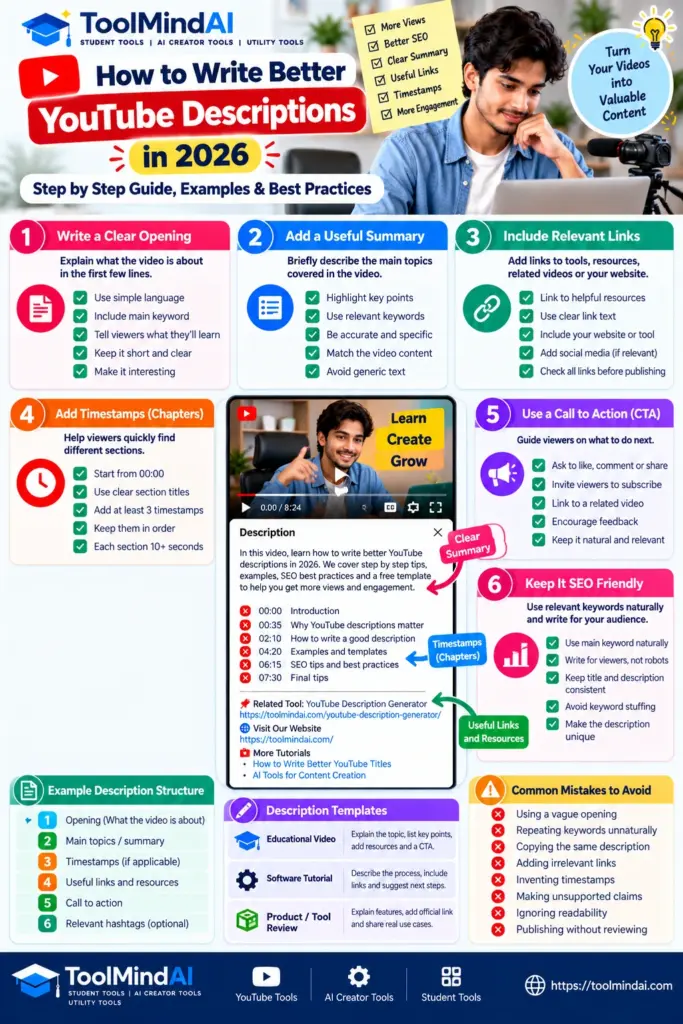
1. Start with a clear opening
The opening lines should quickly explain what viewers can expect. Avoid vague introductions that could describe almost any video.
For example, instead of writing:
“Welcome back to my channel! Today we have another amazing video. Don’t forget to like and subscribe!”
Try:
“In this tutorial, learn how to organise your weekly study schedule, divide time between subjects, and create a realistic revision plan.”
The second example communicates the subject and expected value immediately. A greeting or channel introduction can still be included when it fits your style, but it should not obscure the video’s main purpose.
2. Summarise the video’s main points
After the opening, briefly explain the topics covered. Include details that help viewers understand the scope of the video.
For a cooking tutorial, mention the recipe and important preparation steps. For a software demonstration, identify the feature being explained. For an educational video, outline the concepts or questions addressed.
Keep the summary accurate. Do not list topics, results, or demonstrations that are not actually included in the video.
3. Include relevant keywords naturally
Keywords describe the subject people may search for. If your video teaches viewers how to write YouTube descriptions, that phrase may fit naturally in the opening or summary.
You do not need to repeat the same phrase in every paragraph. Use related terms when they help explain the content, not simply to increase keyword frequency.
For example, a video about beginner photography might naturally mention camera settings, lighting, composition, and practical photography tips if those topics are covered.
Choose words that accurately represent the video rather than adding unrelated trending terms.
YouTube recommends making each video description unique, placing the main topic words prominently in the title and description, and putting the most important information in the opening lines. You can review its official tips for writing video descriptions for additional guidance or watch the video below, from YouTube Creators.
4. Add useful links and resources
Descriptions can direct viewers to resources that support the video. Depending on the content, these might include a referenced article, a tool, a product page, a source document, or another relevant video.
Introduce links clearly so viewers know what they will find. For example:
“Related tutorial: [insert the relevant video link]”
“Resources mentioned in this video: [insert the appropriate resource links]”
Only include destinations that are relevant and accurate. Check links before publishing, particularly when copying a description template from an earlier video.
If a link is promotional or involves an affiliate relationship, follow the applicable disclosure requirements and platform policies.
5. Organise longer descriptions
Longer descriptions are easier to use when their information follows a logical order. You might place the summary first, followed by resources, timestamps, and a short channel-related note.
Use headings where helpful, and avoid adding sections that contain no meaningful information.
For a tutorial, a useful structure could be:
- Video summary.
- Main topics or chapters.
- Tools and resources.
- Related videos.
- A brief, relevant call to action.
Not every video needs all these sections. A short entertainment video may need only a concise summary and one relevant link.
YouTube Description Templates You Can Adapt
A template can make writing descriptions faster, but it should be adapted to the specific video. Replace every placeholder and remove any section that does not apply.
Template 1: Educational video
Opening: Explain the topic and what viewers will learn.
Summary: Mention the main concepts or steps covered.
Resources: Include relevant learning materials or related videos.
CTA: Invite viewers to explore a related lesson or share a relevant question.
Example:
“In this video, learn how to calculate percentages using simple formulas and worked examples. We explain how to find a percentage of a number, calculate marks as a percentage, and understand percentage increases.
Topics covered:
- The basic percentage formula
- Examples using marks
- Percentage increase and decrease
Use the examples to practise the calculations and review the steps whenever you need a refresher.”
This description tells viewers what the lesson covers without claiming that the video guarantees a particular result.
Template 2: Software tutorial
Opening: Name the software or feature being demonstrated.
Summary: Explain the process and the intended audience.
Resources: Link to relevant documentation or tools.
CTA: Suggest a related tutorial if it helps viewers continue learning.
Example:
“This tutorial demonstrates how to organise a basic WordPress page and prepare its content for publication. Follow the steps to review the page structure, check links, and improve readability before publishing.
The demonstration is intended for beginners. Interface labels may vary depending on your WordPress version, theme, and installed plugins.”
Use this structure only when the video actually demonstrates those steps.
Template 3: Product or tool demonstration
Opening: Identify the tool and the task it helps users perform.
Summary: Explain the features shown in the video.
Resources: Add the official product page or relevant documentation.
CTA: Invite viewers to review the tool or explore its features.
Example:
“In this video, we demonstrate a caption-writing tool and explain how to review its suggested text before publishing. You will see how to develop an initial draft, refine the wording, and check that the final caption matches the post.
Tool link: [Insert the verified tool URL]
Generated suggestions may need editing to match your content, audience, and brand voice.”
Keep product descriptions factual. Do not claim that a tool produces guaranteed rankings, engagement, or business results.
YouTube Description SEO: What Actually Matters?
Search optimisation begins with making the video’s subject clear. A description can provide useful context, but it is only one element of how YouTube understands and presents a video.
Write for the intended viewer
Think about what someone wants to learn or accomplish when searching for your topic. A beginner tutorial should use clear language and explain the task directly. A specialist video may need more specific terminology.
Avoid writing a description that targets several unrelated topics. A focused summary is more useful than a long list of keywords.
Use the main phrase naturally
If your video teaches viewers how to write YouTube descriptions, use that phrase where it reads naturally. You can also include closely related terms such as video summaries, description templates, and YouTube SEO when those subjects are genuinely covered.
Do not force the same phrase into every sentence. Repetition makes the writing less natural and does not guarantee better visibility.
Add chapters when they help viewers
For longer videos, timestamps can help viewers navigate to specific sections. Use accurate timestamps and meaningful labels that reflect the content.
For example:
00:00 Introduction.
00:35 Writing the opening lines.
01:50 Adding useful links.
03:10 Common mistakes.
These timestamps are illustrative. Replace them with the actual timings and topics from your video.
For manually added YouTube chapters, the first timestamp must begin at 00:00, the list must contain at least three timestamps in ascending order, and each chapter must be at least 10 seconds long. Check YouTube’s official video chapters instructions for the complete requirements.
Keep titles and descriptions consistent
The video title, thumbnail, and description should represent the same content. If the title promises a tutorial, the video should provide that tutorial, and the description should explain what it contains.
Avoid misleading claims or sensational wording that the video does not support. Clear expectations help viewers decide whether the content is relevant to them.
For current platform-specific guidance, consult the official YouTube Help Center.
For more guidance on writing clear, relevant video titles, read our guide to writing better YouTube titles.
How to Use AI to Write YouTube Descriptions
AI tools can help creators brainstorm opening lines, organise summaries, and adapt descriptions for different video formats. They work best when you provide accurate information about the video rather than asking for a description from only a title.
AI can help organise ideas and prepare a first draft, but creators should still check accuracy, add relevant details, and make the final description genuinely useful to viewers. Google’s guidance on using generative AI content similarly emphasises accuracy, quality, relevance, and adding value for users.
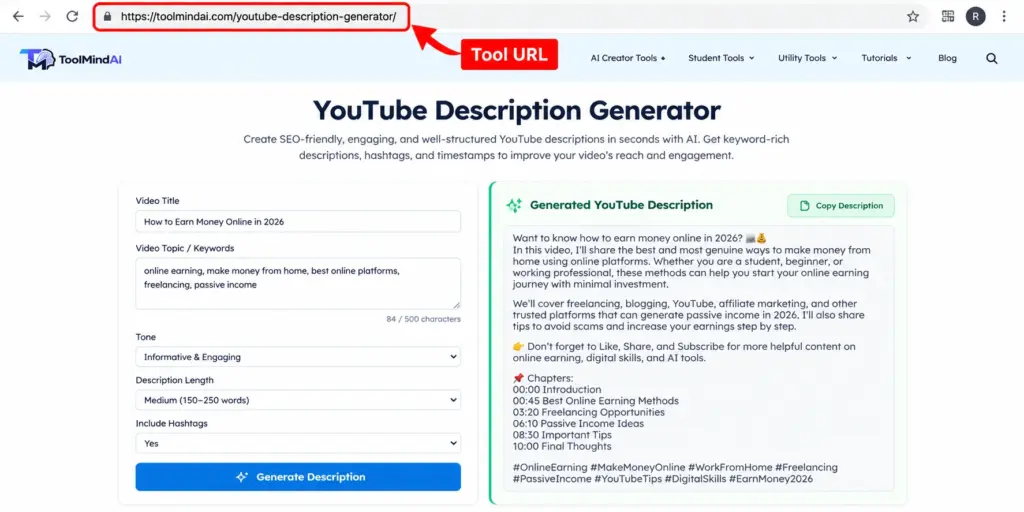
You can also try the YouTube Description Generator to develop a first draft, then edit it to match your video’s actual content and channel style.
Give the AI tool useful context
Include the video topic, intended audience, key points, tone, and any verified links that should appear in the final description.
For example, use this prompt:
“Write a clear YouTube description for a beginner tutorial about creating a weekly study timetable. Summarize the video’s actual topics, use natural language, include the main keyword where appropriate, and suggest one relevant call to action. Do not invent statistics, features, timestamps, or results.”
The prompt sets boundaries and gives the tool a clear task.
To improve your instructions for AI tools, see our guide on how to write better AI prompts for content creation.
Review the draft before publishing
Check whether the generated description accurately represents the video. Remove unsupported claims, unnecessary repetition, irrelevant keywords, and generic promotional language.
If the AI suggests timestamps, links, or resources, verify each one. Do not publish invented chapter times or links that lead to unrelated destinations.
If you use AI for other stages of video production, explore our guide to using AI for YouTube content creation for more practical ideas.
Use ToolMindAI’s YouTube Description Generator
You can try the YouTube Description Generator to help develop a starting draft. Review the output, add accurate details from your video, and edit it to match your channel’s style.
A generator should assist with drafting, not replace the creator’s judgment. Verify that the live tool URL works and that its current features match what the article describes.
Common YouTube Description Mistakes to Avoid
1. Using a vague opening. Tell viewers what the video covers instead of starting with a generic greeting that provides no context.
2. Repeating keywords unnaturally. Use relevant phrases in readable sentences rather than creating a list of repeated search terms.
3. Copying the same description onto every upload. Reusable sections can save time, but each video’s summary should reflect its actual content.
4. Adding irrelevant links. Include resources that genuinely help viewers. Remove outdated or unrelated destinations.
5. Inventing timestamps. Chapter times must match the video. Check them before publication.
6. Making unsupported promises. Avoid claims that a video or tool guarantees views, subscribers, rankings, or revenue.
7. Ignoring readability. Use short paragraphs and sensible sections so viewers can find information easily.
8. Forgetting to review AI output. Generated text can be inaccurate or repetitive. Read and edit the final description yourself.
Frequently Asked Questions
1. How do I write a good YouTube description?
Start with a clear summary of the video, explain its main topics, add relevant links or timestamps when useful, and finish with an appropriate call to action.
2. How long should a YouTube description be?
Use enough text to explain the video and provide useful resources. A short video may need only a brief description, while a detailed tutorial may benefit from additional sections. There is no single length that suits every upload.
3. Should I put keywords in my YouTube description?
Use relevant keywords naturally when they help describe the video. Avoid repetition and unrelated terms. A description should remain clear and useful to viewers.
4. Do YouTube descriptions help with SEO?
Descriptions provide context about the video’s subject and can help viewers find relevant information. However, visibility depends on multiple factors, and no description format guarantees rankings or views.
5. Should I include links in every description?
No. Add links when they provide useful resources, supporting information, or a relevant next step. Check that each destination is accurate and appropriate.
6. Can AI write YouTube descriptions?
Yes. AI can help create drafts and organise information. The creator should verify accuracy, add video-specific details, and remove unsupported claims before publishing.
7. Are timestamps necessary?
Timestamps are optional, but they can help viewers navigate longer videos. Include them when the content has meaningful sections and verify every time against the actual video.
8. Can I use the same description template for every video?
You can reuse a structure, such as a summary followed by resources and a CTA. However, the main description should be tailored to each video’s actual content.
9. Should I add hashtags to YouTube descriptions?
Relevant hashtags may be appropriate when they help identify a video’s topic. Use them sparingly and follow YouTube’s current policies rather than adding unrelated trending hashtags.
10. What is the biggest mistake when writing YouTube descriptions?
The biggest practical mistake is failing to explain what the video actually offers. A clear, accurate summary is more useful than excessive keywords or generic promotional text.
Final Thoughts
A good YouTube description tells viewers what a video covers, explains why the information may be useful, and provides relevant resources without unnecessary clutter. Start with a clear summary, organise additional details logically, and use keywords only where they fit naturally.
Templates and AI tools can make drafting easier, but the final description should reflect the actual video and your channel’s voice. Check links, verify timestamps, and remove unsupported claims before publishing.
Focus on accuracy, clarity, and usefulness. These habits provide a reliable foundation for writing descriptions that help viewers understand your content and decide what to watch next.
Explore ToolMindAI’s creator tools for more resources to support your content creation workflow.