
Instagram captions help creators explain their content, express their personality, provide useful information, and encourage meaningful interactions. A good caption can give a photo, Reel, or carousel more context by telling viewers what they are seeing, why it matters, or what they can learn from it.
However, writing an effective Instagram caption is not always easy. You may have a great photo or video but struggle to find the right opening line, choose a suitable tone, or decide whether to include a question or call to action.
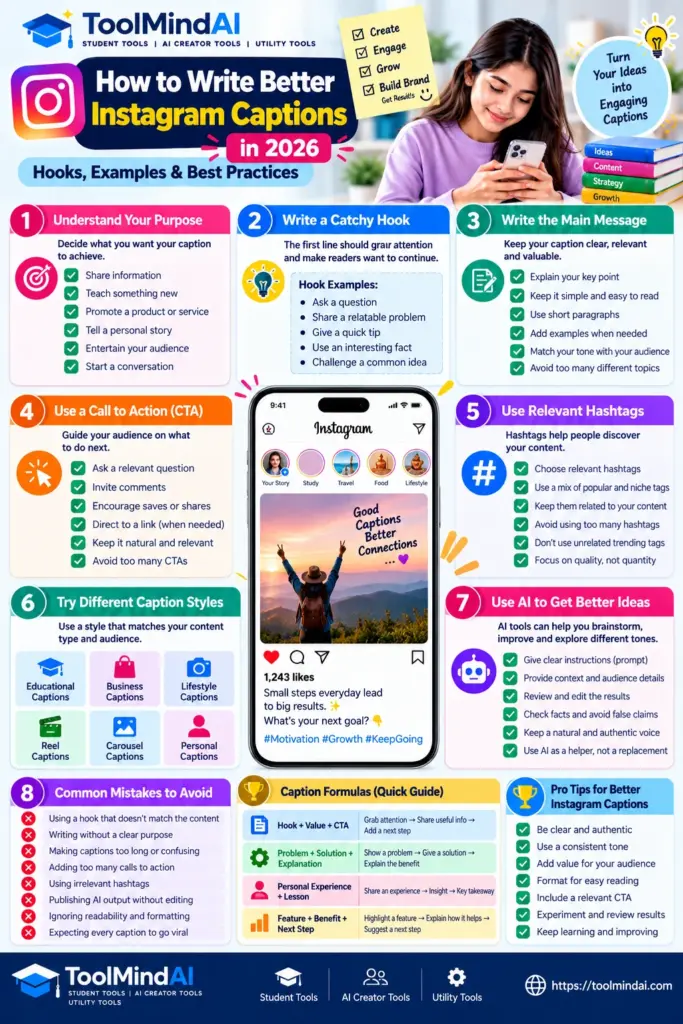
Learning how to write Instagram captions becomes easier when you follow a simple process. Start with a clear purpose, write an opening that fits the content, communicate one main idea, and finish with a natural next step for the reader.
This guide explains how to write better Instagram captions in 2026, with practical formulas, original examples, caption-writing mistakes to avoid, and tips for different types of creators. Whether you manage a business account, publish educational content, share lifestyle posts, or create Reels, you can use these methods to develop a more consistent writing style.
What Makes a Good Instagram Caption?
A good Instagram caption communicates the intended message clearly and matches the content people see in the post. It does not need to be long, clever, or filled with emojis. Its length and style should depend on the purpose of the publication.
For example, a caption for a short comedy Reel might need only one memorable line. An educational carousel may benefit from a longer explanation, while a product post may need details about its features and how people can learn more.
Effective captions generally have five qualities:
- Clarity: Readers can understand the message without unnecessary effort.
- Relevance: The words match the photo, video, Reel, or carousel.
- A suitable opening: The first line gives readers a reason to continue.
- A consistent voice: The caption sounds appropriate for the creator or brand.
- A clear purpose: The caption informs, entertains, explains, or invites a relevant response.
Not every caption needs all five qualities in equal measure. A personal photograph may require very little explanation, whereas a tutorial may need context and instructions.
The goal is to make each caption useful for its particular post rather than forcing every publication into the same formula.
How to Write Instagram Captions Step by Step
You do not need to start with a clever sentence. It is often easier to identify the message first and then choose words that communicate it effectively.
Step 1: Decide the purpose of your post
Before writing, ask yourself what you want the caption to accomplish.
Your purpose might be to:
- Share a personal experience.
- Teach a practical skill.
- Explain a product or service.
- Entertain your audience.
- Invite discussion about a relevant topic.
- Direct interested readers to another resource.
Choose one primary purpose. Trying to sell, entertain, teach, tell a personal story, and request several different actions in the same short caption can make the message confusing.
For example, a creator sharing a study tip could focus on helping students plan their revision. The caption should explain the tip rather than suddenly turning into an unrelated promotional message.
Step 2: Write an opening hook
A caption hook is the opening line that introduces the subject or gives readers a reason to pay attention. It should be relevant to the actual content rather than promising something the post does not deliver.
Here are several approaches you can try.
Ask a relevant question
Example: “What is the one study habit that makes your revision sessions easier?”
This approach works when the question relates directly to the post and invites a genuine response.
Introduce a common problem
Example: “Struggling to organise your study time after college?”
This opening identifies a situation that the intended audience may recognise.
Share a useful takeaway
Example: “A simple weekly study plan can help you see where your available hours are going.”
This approach tells readers what they can expect to learn.
Challenge an assumption carefully
Example: “A longer caption is not automatically a better caption.”
This opening introduces a clear point that the rest of the post can explain.
Avoid exaggerated hooks such as “This secret guarantees viral success” or “Everyone is making this mistake.” Unless a claim can be substantiated, it may mislead readers and weaken trust.
Step 3: Communicate one main idea
After the opening, explain the central message in language your intended audience can understand.
For an educational post, you might provide a short explanation and one practical example. For a personal post, you could describe the experience and what you learned from it. For a product post, explain the relevant feature or benefit without making unsupported promises.
Consider these two examples.
Less effective:
“Study tips, motivation, productivity, success, hard work, goals, and more. Keep working and never give up!”
This caption includes several broad ideas but does not explain anything specific.
More useful:
“Try choosing your three most important study tasks before you begin. Completing those tasks gives your session a clear direction and makes it easier to review your progress.”
The second version communicates one practical idea that readers can try.
Step 4: Format the caption for readability
A caption should be easy to scan on a small screen. Long blocks of text can feel difficult to read, especially when the content contains several different points.
For longer captions, consider using:
- Short paragraphs.
- Simple sentences.
- Numbered steps where sequence matters.
- Bullets for separate tips.
- Emojis only when they help communicate meaning or tone.
For example, an educational caption could introduce a problem, offer three tips, and end with a relevant question. Each section should contribute to the same message.
Do not insert line breaks after every few words merely to make a caption look longer. Use formatting to improve comprehension, not to create unnecessary visual clutter.
Step 5: Finish with a relevant call to action
A call to action, often shortened to CTA, tells readers what they can do next. It should be appropriate for the post and easy to understand.
Examples include:
- “Which of these tips would you try first?”
- “Save this checklist if you plan to use it later.”
- “Share your favourite revision method in the comments.”
- “Read the full guide for the step-by-step explanation.”
- “Explore the product details before deciding whether it suits your needs.”
A CTA is optional. A short personal caption may feel more natural without one.
Avoid adding several competing requests to every post. Asking readers to comment, share, save, follow, tag friends, and visit a website at the same time can distract from the main message.
Instagram Caption Formulas You Can Adapt
Caption formulas provide a starting structure, but they should not replace original ideas. Adapt the wording to the post, audience, and purpose.
Formula 1: Hook + Value + CTA
Use this structure for educational posts, tips, and practical advice.
Structure:
Hook → Useful information → Relevant next step
Example:
“Finding it difficult to plan your revision?
Start by listing the chapters you need to review, then divide them across the days you have available. Leave some time for practice questions and revisiting difficult topics.
Which subject are you planning to revise first?”
This caption introduces a problem, provides a practical suggestion, and ends with a related question.
Formula 2: Problem + Solution + Explanation
This formula is useful when your post addresses a common challenge.
Structure:
Problem → Suggested solution → Why it may help
Example:
“Not sure what to write in your next blog post?
Start with one question your readers genuinely want answered. Turn it into a clear outline, then organise the article around the information readers need.
A focused outline can make the writing process easier to manage.”
The caption explains a process without promising guaranteed traffic or rankings.
Formula 3: Personal Experience + Lesson
Use this approach for storytelling, creator updates, and reflective posts.
Structure:
Experience → Observation → Lesson
Example:
“Creating content becomes easier when you stop trying to explain everything in one post.
Choose one main idea, support it with a useful example, and give readers a clear takeaway. You can explore related ideas in separate posts.”
Use genuine experiences when writing in the first person. Do not invent personal stories, results, or testimonials just to make a caption sound more convincing.
Formula 4: Feature + Practical Benefit + Next Step
This structure works for product demonstrations and tool introductions.
Structure:
Relevant feature → What it helps the user do → Optional next step
Example:
“Planning a new social media post?
An organised caption outline can help you introduce your topic, explain the main point, and finish with a relevant call to action.
Draft the message first, then edit it to match your audience and brand voice.”
Describe features accurately and avoid presenting a product as a guaranteed solution to every content problem.
Instagram Caption Examples for Different Types of Creators
The best caption style depends on what you publish and what your audience expects. A caption that works for a personal photograph may not suit a product demonstration or an educational carousel.
Use the following examples as starting points. They are original examples, not guaranteed formulas for engagement.
1. Educational Instagram captions
Educational creators should focus on explaining one useful concept clearly. The caption can introduce the topic, summarise a key lesson, and invite readers to explore it further.
Example:
“Want to make your study sessions more organised?
Start by choosing a few specific tasks before you sit down to study. Divide your available time between those tasks, include short breaks, and review what you completed at the end.
A simple plan can help you understand how you use your time.
What subject are you focusing on this week?”
This example works as an educational caption because it gives readers a practical idea rather than relying only on motivational language.
2. Business and product captions
Business captions should explain the relevant product, service, or customer benefit. They should be clear about what is being offered and avoid unsupported promises.
Example:
“Looking for a simpler way to organise your weekly tasks?
Our planning template helps you list priorities, assign time blocks, and review your progress. Adapt it to your own schedule instead of trying to follow someone else’s routine exactly.
Explore the details to see whether it suits your needs.”
Only use this example as a template. Replace the generic product description with accurate details about the real product or service.
3. Lifestyle and personal captions
Personal captions can be conversational and brief. They may describe an experience, express a feeling, or share a small observation.
Example:
“Some days are for making progress. Other days are for slowing down, resetting, and starting again tomorrow.
A little consistency matters more than trying to make every day perfect.”
This style suits reflective content, but it should match the creator’s actual voice rather than sound like a generic motivational quotation.
4. Instagram Reel captions
Reel captions can introduce the video’s subject, add context, or highlight a point viewers might otherwise miss. The opening should match what the video actually shows.
Example:
“Three simple ways to organise your next study session:
- Choose your main task.
- Set a realistic time block.
- Review what you completed.
Save these steps if you want to try this approach during your next revision session.”
If the Reel already contains all the instructions on screen, the caption can be shorter and focus on context or a useful takeaway.
Creators who publish video content can also learn how to write clearer, more informative titles in our guide to writing better YouTube titles.
5. Carousel captions
Carousels often contain several slides that explain a topic step by step. The caption can introduce the overall subject, tell readers what they will learn, and direct them to the relevant slides.
Example:
“Building a weekly content plan does not have to be complicated.
This carousel walks through the basics: choosing your topics, organising ideas, assigning publishing dates, and leaving room for changes.
Which part of content planning takes you the most time?”
Avoid repeating every slide word for word in the caption. Use it to complement the visual content.
How to Use Hashtags in Instagram Captions
Hashtags can help describe a post’s topic and make its subject clearer. However, adding more hashtags does not automatically make a post more successful.
Choose hashtags that accurately describe the content, audience, or niche. For an educational post about caption writing, relevant examples might include:
#InstagramCaptions#ContentCreation#SocialMediaTips#ContentWriting
These are examples of relevant labels, not a guarantee that a post will reach more people.
Before publishing, ask whether each hashtag genuinely describes the post. Avoid unrelated trending hashtags, repeated blocks of irrelevant tags, and labels chosen solely because they appear popular.
Instagram’s features and recommendation systems can change. For current platform-specific rules, consult the official Instagram Help Center.
Hashtags are only one part of publishing a useful post. The content itself, its relevance to the intended audience, and how clearly it communicates its message remain important considerations.
How to Use AI to Write Better Instagram Captions
AI tools can help you brainstorm caption ideas, explore different tones, shorten long drafts, and generate alternative openings. They are most useful when you give them enough context to produce a relevant first draft.
You can use the Instagram Caption Generator to create caption drafts, explore different tones, and develop ideas for your next post.
However, an AI-generated caption should not automatically be treated as ready to publish. It may contain vague claims, repetitive phrases, incorrect details, or a tone that does not match your audience.
Clear instructions about the audience, purpose, format, and tone can help an AI writing tool produce a more relevant first draft. Meta’s guide to using Meta AI for Instagram captions provides additional examples of AI-assisted caption writing.
Step 1: Give the tool clear instructions
Describe the post, intended audience, purpose, and desired tone. If there are product details or facts that must remain accurate, provide those details explicitly.
For example, you could use this prompt:
“Write three Instagram caption options for a short educational Reel about planning study time. Use clear, natural language for students. Make each caption different in tone, avoid exaggerated claims, and finish with one relevant optional question. Do not invent statistics or personal experiences.”
This prompt defines the subject and constraints instead of simply asking for a caption.
For more guidance on writing clear instructions for AI tools, read our guide on how to write better AI prompts for content creation.
Step 2: Choose the most relevant draft
Review the alternatives and choose the one that best matches the post. You may prefer the shortest version, the clearest explanation, or the opening that most naturally introduces the content.
Do not select a caption only because it sounds dramatic. It should accurately represent the post.
Step 3: Edit for a natural voice
Replace generic wording with language that suits your audience. Remove unnecessary adjectives, repetitive phrases, excessive emojis, and statements that sound unlike your usual communication style.
If you have genuine experience relevant to the topic, add it accurately. Do not let an AI tool invent a personal story, testimonial, credential, or result.
AI can assist with drafting, but the final content should still be accurate, original, and useful to readers. Google’s guidance on using generative AI content explains why quality, relevance, and added value matter when publishing AI-assisted material.
The same editing principles apply when using AI for other creator tasks. See our guide to using AI for YouTube content creation for more practical examples.
Step 4: Check facts and links
Verify names, product details, dates, statistics, and other factual claims before publishing. Check that any links or calls to action point to the intended destination.
AI can help with drafting, but responsibility for the published caption remains with the creator.
Try ToolMindAI’s Instagram Caption Generator
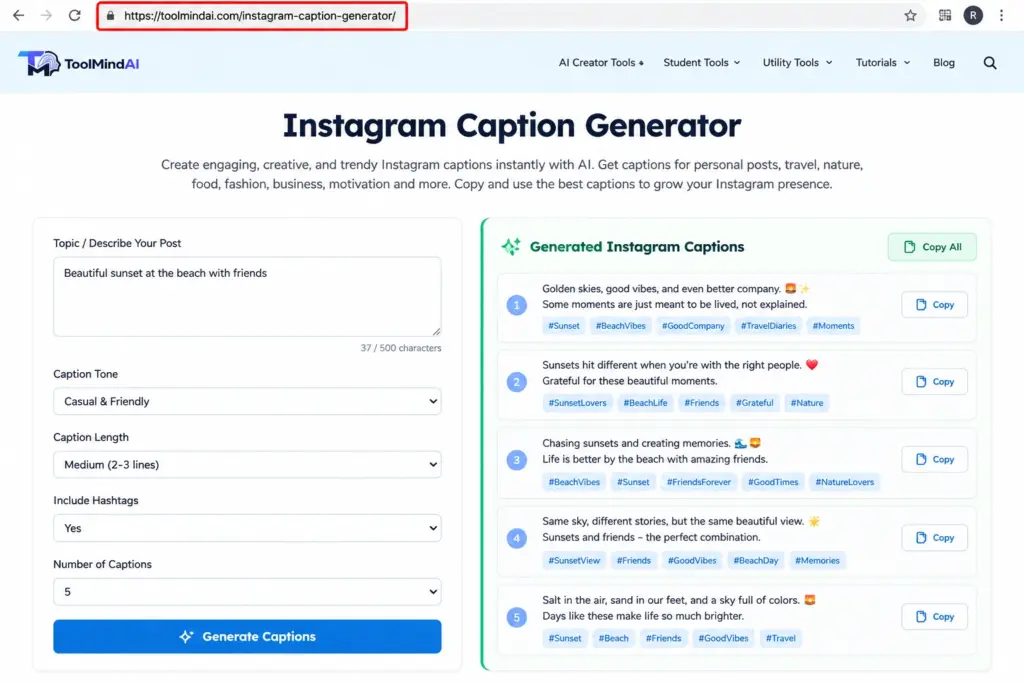
ToolMindAI’s Instagram Caption Generator is intended to support caption creation. You can use a caption generator as a starting point, then review and edit the result for accuracy, originality, relevance, and your own brand voice.
Before publishing, verify that the linked tool URL is correct and that its live functionality matches the description. A generated caption should be treated as a draft, not a substitute for editorial review.
Common Instagram Caption Mistakes to Avoid
Even a well-designed post can have a caption that makes the message harder to understand. These common mistakes are worth checking before you publish.
1. Using a hook that does not match the post
A dramatic opening may attract attention, but it damages trust if the content fails to deliver what it promises. Keep the hook relevant and accurate.
2. Writing without a clear purpose
If the caption moves between several unrelated subjects, readers may struggle to identify its main point. Decide what the post should communicate before writing.
3. Making every caption too long
Long captions can be useful for tutorials, explanations, and stories. Short captions are often sufficient for simple visual posts. Choose the length that suits the message.
4. Adding too many calls to action
A caption that asks readers to follow, share, comment, save, tag friends, and visit a website simultaneously can feel cluttered. Prioritise one relevant action when a CTA is needed.
5. Using irrelevant hashtags
Hashtags should describe the actual content. Unrelated labels can make a post appear unfocused and may attract an audience that is not interested in the subject.
6. Publishing AI output without reviewing it
Generated text may sound repetitive or contain inaccurate information. Read every caption before publishing and make corrections where necessary.
7. Ignoring accessibility and readability
Avoid excessive decorative characters, unexplained abbreviations, and emoji sequences that make the message harder to follow. Keep language understandable and use line breaks when they improve readability.
8. Assuming every caption must go viral
No caption formula can guarantee reach, comments, or sales. Focus on communicating something useful or interesting to the intended audience, then review performance over time.
How to Review and Improve Your Instagram Captions
Caption writing improves when you examine what you publish and learn from the results. Rather than changing everything after every post, review a few relevant signals and look for patterns.
For platform-specific guidance, Instagram’s professional dashboard includes a Best Practices section covering content creation, engagement, reach, and other creator topics. Read Meta’s announcement about Instagram’s creator best practices for more information.
Depending on the account and the available Instagram Insights, you may be able to examine interactions such as comments, shares, saves, and other post-level results.
Use these observations to ask practical questions:
- Did the caption clearly explain the post?
- Did readers respond to the question or discussion prompt?
- Did the caption provide useful context beyond the visual?
- Was the call to action relevant to the content?
- Did the tone suit the intended audience?
Compare posts with similar purposes where possible. A tutorial and a personal photograph have different goals, so their performance should not necessarily be judged using the same criteria.
Change one element at a time when testing a new approach. For example, try a more direct opening in a future educational post while keeping the overall format similar. This will not establish a perfect scientific test, but it can help you make more informed editorial decisions.
The objective is to understand your audience and improve the clarity and usefulness of your content—not to chase every trend.
Frequently Asked Questions
1. How do I write a good Instagram caption?
Start by deciding the purpose of the post. Write a relevant opening, communicate one main idea, format the text for readability, and include a suitable call to action if it adds value.
2. How long should an Instagram caption be?
There is no ideal length for every post. Use a short caption when the visual communicates the message clearly and a longer caption when readers need additional context, instructions, or explanation.
3. Should I use hashtags in every caption?
Not necessarily. Use relevant hashtags when they help describe the topic or audience. Avoid adding unrelated hashtags simply to make the caption look optimised.
4. Can AI write Instagram captions?
AI tools can generate draft captions, alternative hooks, and different tones. Review the output for accuracy, relevance, originality, and consistency with your brand voice before publishing.
5. What makes an Instagram caption engaging?
A relevant message, clear writing, a suitable opening, and a useful takeaway can help a caption connect with its intended audience. Engagement is not guaranteed by any single technique.
6. How do I write captions for Instagram Reels?
Introduce the subject of the video, add context that helps viewers understand it, and highlight a relevant takeaway. Avoid promising information that the Reel does not contain.
7. Should every Instagram caption include a call to action?
No. Use a CTA when there is a natural next step, such as answering a relevant question or exploring a related resource. Some personal or visual posts work well without one.
8. How can I make AI-generated captions sound natural?
Remove generic wording, use your normal vocabulary, shorten unnecessary sentences, and include only genuine details. Make sure the caption reflects the content and does not invent experiences or claims.
9. Do Instagram captions help with discoverability?
Captions provide context about a post, and relevant wording can help communicate its subject. However, discoverability depends on multiple factors, and no particular caption structure guarantees reach.
10. Can I reuse the same caption on every post?
You can reuse a structure or brand voice, but the actual caption should match each post. Repeating identical text regardless of context can make your content less specific and less useful.
Final Thoughts
Writing better Instagram captions starts with understanding the purpose of your post and the people you want to reach. A clear opening, one main message, readable formatting, and a relevant next step provide a useful foundation.
Caption formulas can help you get started, while examples and AI tools can make brainstorming easier. The final caption should still reflect the content accurately, use a natural voice, and offer readers something relevant.
Experiment with different approaches, review your results, and improve your writing over time. Rather than trying to make every caption sound clever, focus on making each one clear, appropriate, and useful for its intended audience.
Explore ToolMindAI’s creator tools to find more resources for planning and creating digital content.